


Error Message: "This app doesn't support print preview"

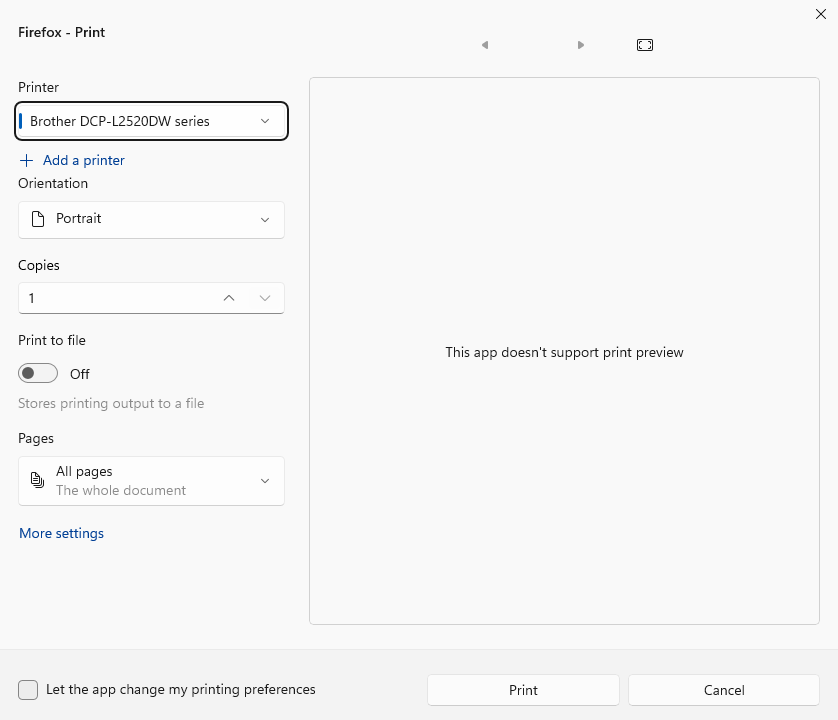
When I click on option/link for "Print using the system dialog box", the print preview no longer works. Instead I see message "This app doesn't support print preview" in preview pane.
All Replies (3)
If you cannot see any content on pages you printed or in print preview, the cause might be margins which are set too high. To check the margins:
- Open the Page Setup window in Firefox, using one of these methods:
- Click the Firefox menu button
 and select menu Print. In the print preview window that opens, click Page Setup.
- In the Firefox Menu bar, click File and then Page Setup.
Note: On Windows and Linux, the File Edit View History Bookmarks Tools Help Menu bar is hidden by default. See Restore the Menu bar in Firefox or, on Windows, press the alt key to temporarily show the Menu bar.
- Click the Firefox menu button
- In the Page Setup window, switch to the Margins & Header/Footer tab.
- Check what's set there under Margins.
The following are the default values for Margins:
Right: 12.7 mm, or 0.5 in
Top: 12.7 mm, or 0.5 in
Left: 12.7 mm, or 0.5 in
Bottom: 12.7 mm, or 0.5 in
Check these values accordingly and change them if necessary.
For more about Firefox printing issues, see the Fix printing problems in Firefox article.

"Print using the system dialog box" means that you are using the operating system's print facility, not Firefox. If you system's print dose not provide preview, you will see "This app doesn't support print preview".
You can go back to Firefox's print by not click the system option.
I actually do need to open the system option as I need to change/select other settings which don't come up on Firefox's print. When I was on Windows 10, I had no issues. Not sure why the preview pane will no longer come up when I enable the "print using the system dialog box".