


Unable to upload or download files: file chooser window does not appear, request ignored

My current version of Firefox is 149.0 (64 bit) Mozilla Firefox for Arch Linux Arch Linux - 1.0 I am running this on two computers, a laptop and a desktop, both running Arch Linux, currently at 6.19.10. I use the laptop much more, and recently noticed that I cannot upload or download files with Firefox. No file selection window opens and the request is simply ignored. Nothing appears in my Downloads folder. Meanwhile, I also noticed that this function works just fine on the desktop computer. I don't remember making any settings changes. I do have popups generally disabled but can enable them for certain sites. In any case, I have tried enabling popups and redirects completely with no change. I figure there must be something different about the settings on these two Firefox installations, but what? What can you tell me? Or ask me? Thanks.
All Replies (9)

Frank Huddleston said
I use the laptop much more, and recently noticed that I cannot upload or download files with Firefox. No file selection window opens and the request is simply ignored. Nothing appears in my Downloads folder. Meanwhile, I also noticed that this function works just fine on the desktop computer.
So it works on one computer and not the other. What are you seeing in the logs when attempting to download or upload? Does it happen under a different user on the laptop?
If your distro has a live usb stick, give it a try and see what happens.
Try downloading Firefox from Mozilla, run firefox-bin from the folder and see if you have the same issue. https://www.mozilla.org/en-US/firefox/all/#product-desktop-release
Did you try with Firefox in Troubleshoot Mode? https://support.mozilla.org/en-US/kb/diagnose-firefox-issues-using-troubleshoot-mode#w_how-to-start-firefox-in-4troubleshoot-modesf5safe-modesf
What Desktop? X11 or Wayland?
No such issues for me.
Operating System: openSUSE Tumbleweed 20260330 KDE Plasma Version: 6.6.3 KDE Frameworks Version: 6.24.0 Qt Version: 6.11.0 Kernel Version: 6.19.10-1-default (64-bit) Graphics Platform: X11 Processors: 16 × AMD Ryzen 7 5825U with Radeon Graphics Memory: 64 GiB of RAM (62.1 GiB usable) Graphics Processor: AMD Radeon Graphics Manufacturer: HP Product Name: HP ProBook 455 15.6 inch G9 Notebook PC
Here's what I see for file picker in about:config. see screenshot
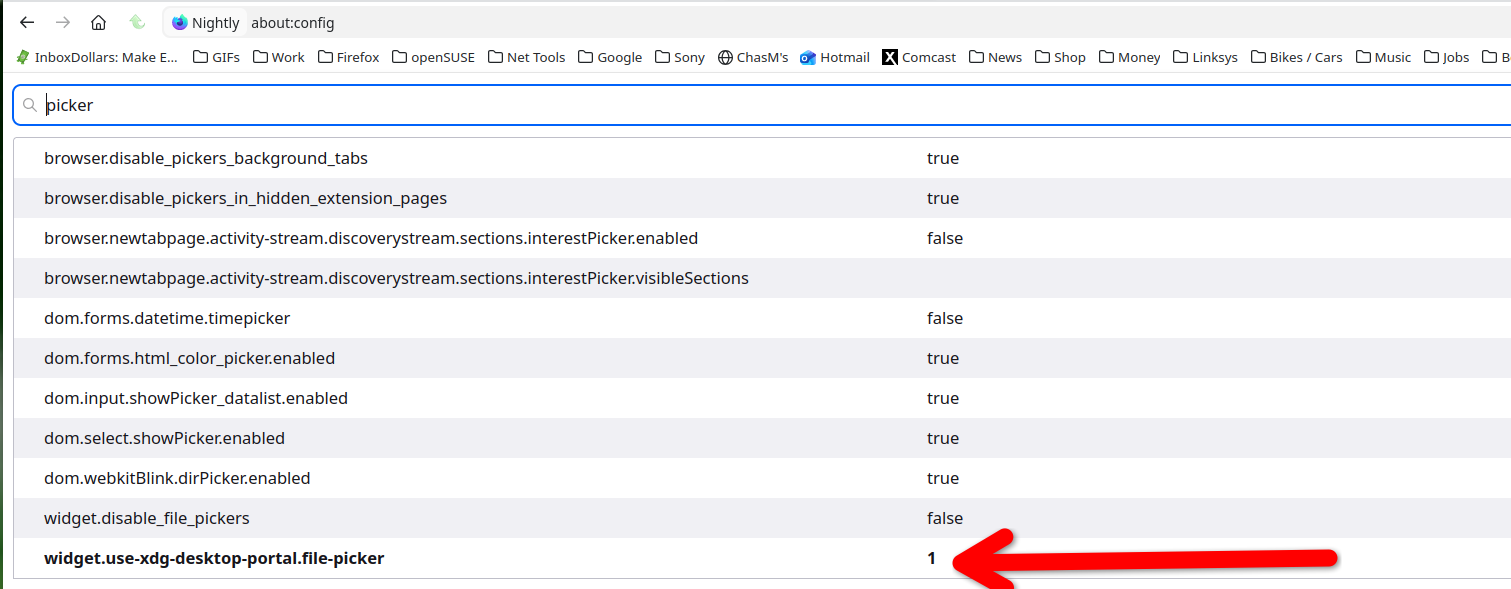
I checked the file picker parameter(s) and in both of my firefox instances it's set to '2'. I tried setting it to '1' but it reverted to '2'. I assume there's a way to make it stick but since both are '2', that's probably not the problem, although it looked promising. I checked the other parameters that came up with that and they are all the same, too.
 I tried just doing a reinstall, not from the source mentioned, but just from my distribution. I did not remove first, just installed. Nothing changed.
 In the log (browser console), when, for example, I select the option to upload a file to my Google Drive,
I see a warning: Empty string passed to getElementById(). That's with the "multiprocess" view selected.
I'm thinking: maybe create another profile and see if it's different?
Yes, and make sure to make a back-up of your data it you have it.
You can also try Refreshing Firefox. https://support.mozilla.org/en-US/kb/refresh-firefox-reset-add-ons-and-settings
This can be an issue with "xdg-desktop-portal", you may have to install some packages like xdg-desktop-portal and xdg-desktop-portal-gtk.
I created a new profile: same behavior. I renamed the .mozilla/firefox directory and started firefox: same behavior I did not see the "refresh" option in "more troubleshooting information". Only "troubleshooting mode" and "clear startup cache". I did clear the cache: same behavior.
OK this problem is not limited to firefox: I have the same behavior in Chromium!
I did install those two xdg packages recommended. No change.
Well that's not quite true about Chromium: it does show the same problem: can't attach files to email in GMail, can't upload files in Google Drive. But I was able to download a bank statement from my bank website, which I could not do with firefox. So I'll keep seeing what works and what doesn't, and widen my search. Thanks for the help and suggestions.