


How do I make "convert to" active, when it's grayed out?

When I right click on a task, convert to is grayed out, not allowing me to convert task to event
Vahaolana Nofidina
As a heads up, the bug I reported has been fixed. That is the right click on a TASK > 'Convert to' option. I'm now testing in beta 156.0b2 and the 'Convert to' is no longer greyed out. So converting a Task to an Event is now working and also for Events, the Convert to Task is also working. But it should be working ok in current channels ESR 153.1.1esr and Release 154.0 .
All Replies (10)
What OS are you using eg: Windows 11,MAC or Linux ? What version of Thunderbird are you using ?
I've just tested in beta 150.0b1 and see the same But it works ok in version 140.9.0esr I'll check to see if a bug report has been created.
Windows 11 and Thunderbird Desktop Version 149.0.1 Released March 26, 2026
Many thanks - as I did not locate a current bug - I've created a bug report. I believe this must be something only just occurred in the 'Release' version as it's still ok in the current ESR version. This is a link to that report should anyone want to follow details, progress etc.
So can I revert to earlier version, or is there some other way to convert tasks to events, while I wait for the fix?
As a heads up, the developers were on to this bug very quickly and it has been marked as fixed. I believe the target is version 151.0, so should not be too long. As you are on the release version, updates are done more frequently - usually monthly, but it's likely to appear in the beta first for testing. You may feel that's too long to wait.
To go back to the version prior to the one you are currently using will mean you need to do the following. 1. Set up updates to inform you of updates, but not update unless you say do it.
- Settings > General
- scroll down to 'Updates' section
- Select: 'Check for updates, but let me choose whether to install them'
To check which version was previous installed click on 'Show Updates History' button I think it might have been version 148.0.1 (tell me if different)
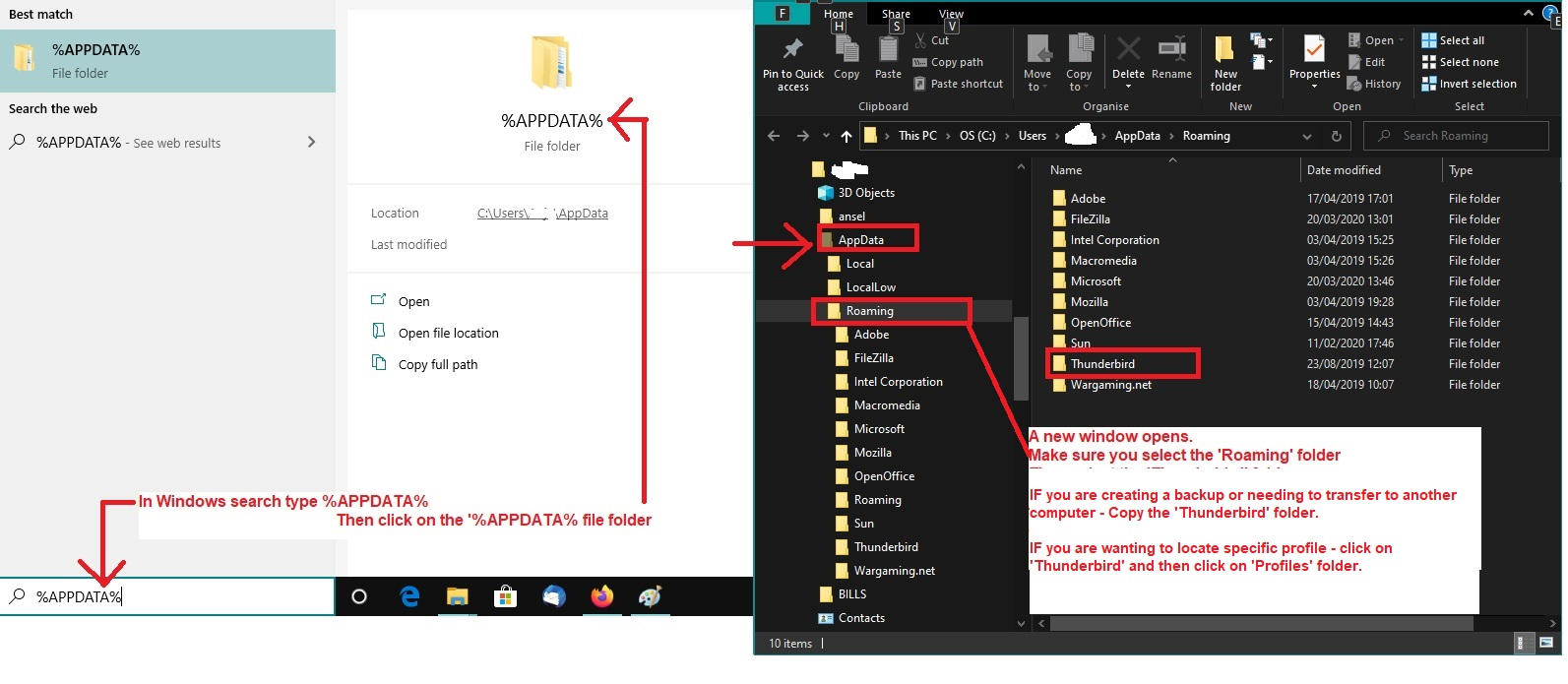
2. Exit Thunderbird 3. Uninstall Thunderbird 4. Access Profile and delete the 'compatibility.ini' file Assuming you installed Thunderbird from the official website and NOT via Windows App Store (please tell me if you did install Thunderbird from Windows App Store) Image below as a guide
- In windows search type : %Appdata%
- Select : %Appdata% file folder
- Select: Roaming folder
- Select: Thunderbird folder
- Select: Profiles folder
- Select: the profile name folder
- Delete: 'compatibility.ini' file
5. Download and install a previous version - which I think was version 148.0.1
- Use this link: https://ftp.mozilla.org/pub/thunderbird/releases/148.0.1/win64/
- Select the relevant language: eg: en-GB = English British
- Click on the text link: 'Thunderbird Setup 148.0.1.exe ' to get download.
Novain'i Toad-Hall t@

I was looking up how to do this, and my case is even more interesting:
I have no grayed out convert to task button, It does not exist.
Linux Fedora 44 - Thunderbird 153.0.2 Is this an option you need to enable in the settings?
Vahaolana Nofidina
As a heads up, the bug I reported has been fixed. That is the right click on a TASK > 'Convert to' option. I'm now testing in beta 156.0b2 and the 'Convert to' is no longer greyed out. So converting a Task to an Event is now working and also for Events, the Convert to Task is also working. But it should be working ok in current channels ESR 153.1.1esr and Release 154.0 .
tristanvercruysse+mozilla said
I was looking up how to do this, and my case is even more interesting: I have no grayed out convert to task button, It does not exist. Linux Fedora 44 - Thunderbird 153.0.2 Is this an option you need to enable in the settings?
What did you right click on? Clearly you are not talking about a right click on a TASK to convert to an Event as per all previous comments.
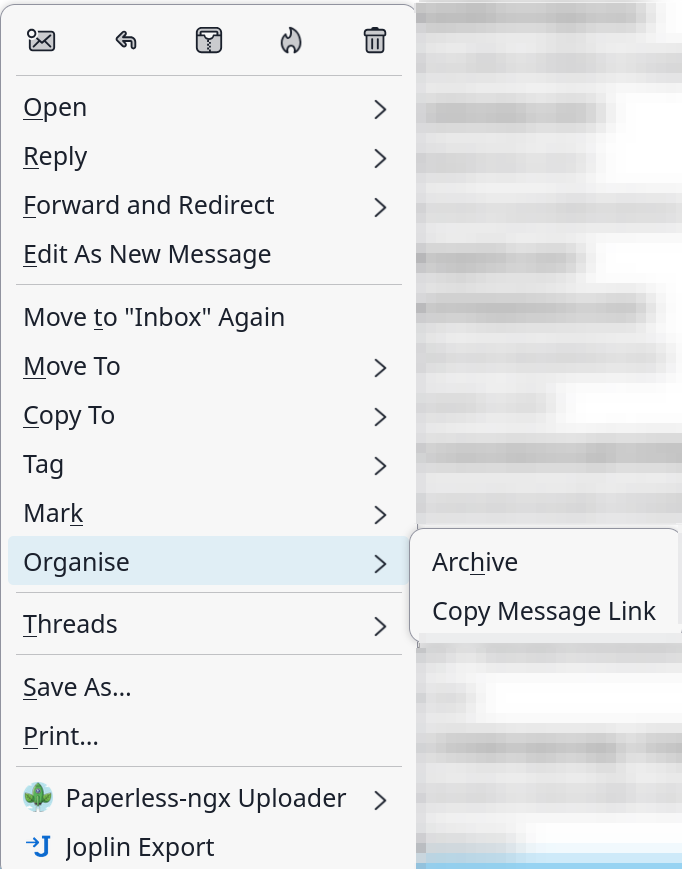
The pop up menu looks like a right click on a received email.
In beta 156.0b2 Right click on email - 'Organise' now offers 3 options:
- Archive
- Convert to >
- Copy Message Link
I note your image is not showing the 'Convert to' option. Possibly implying the Calendars are disabled, not synched or set up as read-only.
Please check your Calendars to see if they are eg: disabled.
Ooh, I see, I'm trying to create a task or event from a mail. I had not read the initial part correctly.
Is this something that is possible? Or should I maybe open a feature request.
Thank you for clarifying things.
tristanvercruysse+mozilla said
Ooh, I see, I'm trying to create a task or event from a mail. I had not read the initial part correctly. Is this something that is possible? Or should I maybe open a feature request. Thank you for clarifying things.
Ideally, you would have asked this as a new question, but I'm offering info anyway.
The option to Convert a received email into a Task or an Event already exists and been available for years. So no point is asking for a feature that has been around for at least a decade.
However, in your case the 'Convert to' is not available, it's not visible in the drop down menu. I do know, that if you have not got any calendars set up and enabled and not read-only then the 'convert to' option will not display. You cannot convert to an Event or Task in a calendar if the calendar is not enabled or set up as 'read-only'. Hence the option will not be offered. So, first you need to check your Calendars.