


How can I stop Firefox from crashing multiple times a day?

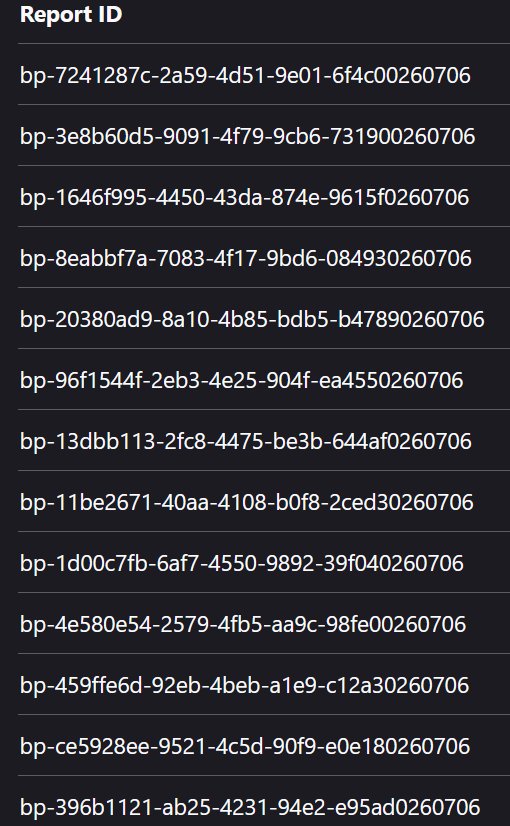
Hello, Whenever I open Firefox, it crashes repeatedly. This has been going on for at least a couple of weeks, whether it's right when I open it or hours later when I'm in the middle of something. I've disabled extensions, ran it in troubleshoot, and done the steps advised to no avail. Any help would be greatly appreciated as this has rendered Firefox unusable. Attached is a screenshot of the digits of the crash reports, as well as the link for the one from today.
All Replies (3)

Thanks for reporting.
There are some tips for mitigating crashes (you may have done them): https://support.mozilla.org/en-US/kb/avoid-crashes-tips-and-tricks
You can report your crashed by https://support.mozilla.org/en-US/kb/crash-report This will be helpful for future improvements.
I don't use Windows, but I know 11 is memory hungry. You try a free (as in freedom) system, like GNU.
I'll see if I picked the crash IDs correctly from the image:
bp-7241287c-2a59-4d51-9e01-6f4c00260706 bp-3e8b60d5-9091-4f79-9cb6-731900260706 bp-1646f995-4450-43da-874e-9615f0260706 bp-8eabbf7a-7083-4f17-9bd6-084930260706 bp-20380ad9-8a10-4b85-bdb5-b47890260706 bp-96f1544f-2eb3-4e25-904f-ea4550260706 bp-13dbb113-2fc8-4475-be3b-644af0260706 bp-11be2671-40aa-4108-b0f8-2ced30260706 bp-1d00c7fb-6af7-4550-9892-39f040260706 bp-4e580e54-2579-4fb5-aa9c-98fe00260706 bp-459ffe6d-92eb-4beb-a1e9-c12a30260706 bp-ce5928ee-9521-4c5d-90f9-e0e180260706 bp-396b1121-ab25-4231-94e2-e95ad0260706
Huh so normally I'd just attribute these to resource exhaustion as most logged something in the neighborhood of:
"System Memory Use Percentage: 94 % used"
so that's just running at its limit, but then there's this one crash-stats.mozilla.org/report/index/11be2671-40aa-4108-b0f8-2ced30260706 that seems to have enough memory still.
I'm wondering, if you check your Windows task manager for things running, is there anything that would grab most of your system RAM, or is Firefox the thing that's consuming most?
Firefox has this functionality https://support.mozilla.org/kb/task-manager-tabs-or-extensions-are-slowing-firefox to help you glance its individual processes' consumption as well, to see if there's something out of the ordinary. (It does end up in the same state in Troubleshoot Mode without any addons, right? Are the websites loaded or their amount worth mentioning, or nothing special?)