


Where are login controls kept?

When I close the browser my Facebook logs out and when I want to get back in I muse insert my log in email and password but not always.
All Replies (14)
Hi Gerard,
Facebook keeps you signed in with a cookie, so if Firefox clears cookies when you close it, you will be signed out each time.
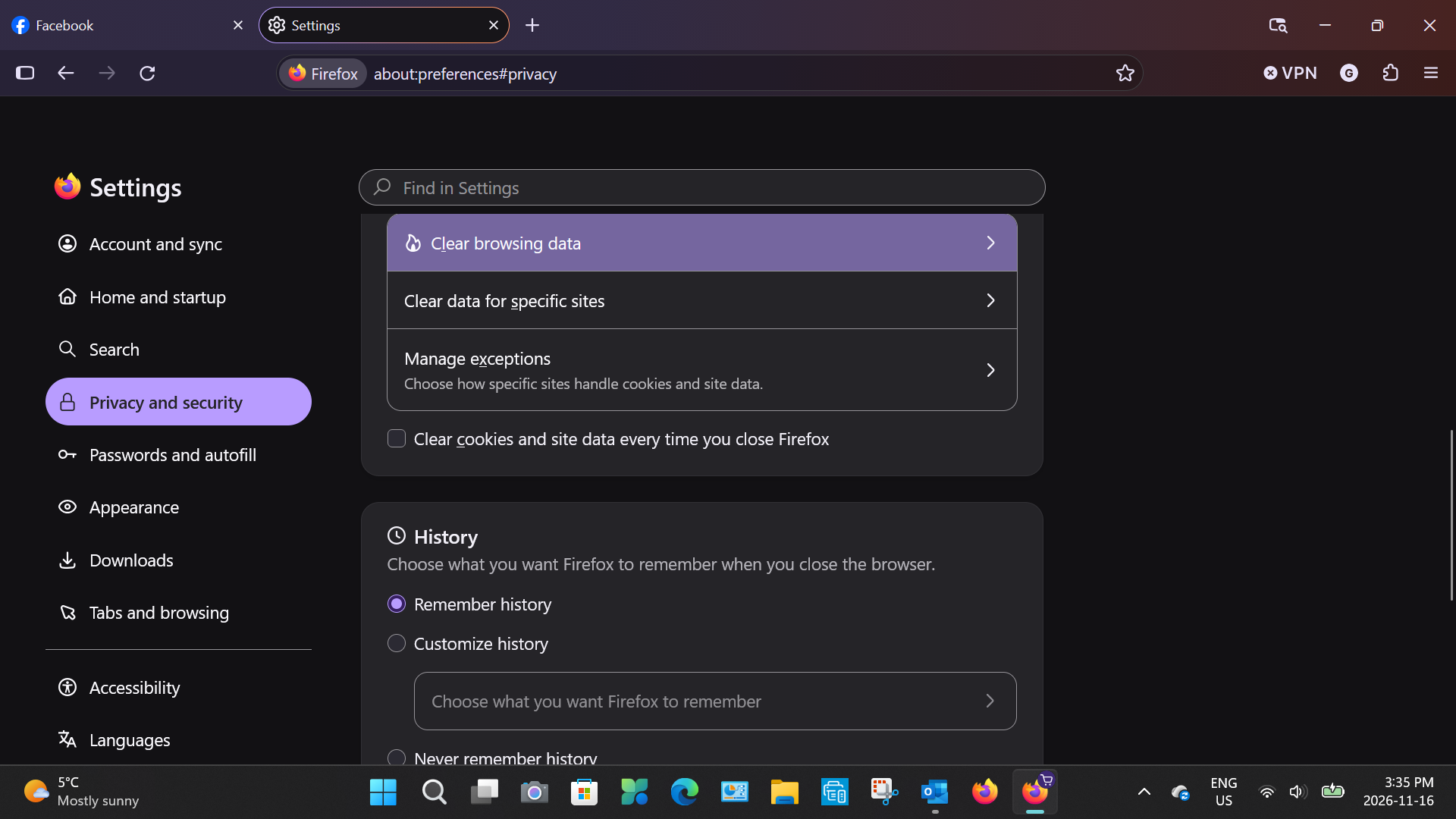
Please check this first in Firefox: open Settings, then Privacy and Security. Under Cookies and Site Data, make sure the box for deleting cookies and site data when Firefox is closed is not ticked. Then, under History, check that Firefox is not set to clear cookies when you close it.
Also, when you sign in to Facebook, tick the option to stay signed in, and check that you are not using a private window, as private windows do not keep logins after you close them.
If that does not help, check whether an add-on or a cleaner app on your computer is clearing cookies, as that would sign you out too.
Let us know what you find.
This is what my screen look like. The only cleaner I have is Glary Utilities and to my knowledge no cookie control. I did a refresh and that did not help any
Hi Gerard, while you are on Facebook, could you take a look at the cookies list? To open that, press Shift+F9 to display the "Storage Inspector" in the lower part of the tab. It should open to the Cookies section, but you might need to click some different Facebook domains to see actual lists. What I'm curious about is the "Expires" column. This may list a date in the near or distant future - a persistent cookie - or the word Session - a cookie that will be gone after you close Firefox. Does Facebook seem to be setting persistent cookies?
Is this what you are talking about? BTW Facebook no longer has a stay in button, they rely on the browsers to handle that.
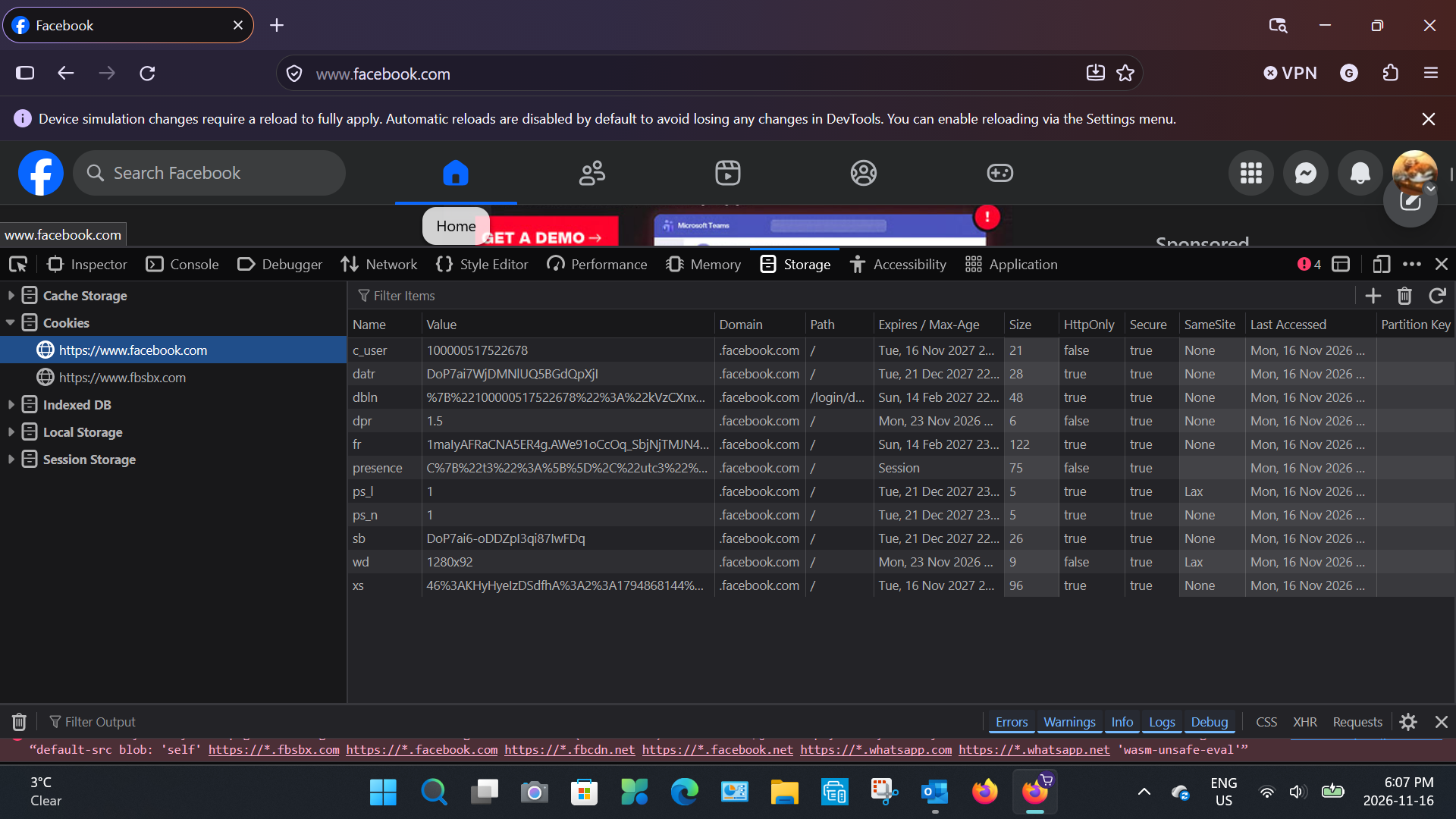
Hi Gerard, it looks like Facebook is setting persistent cookies, so either Firefox, an extension, or an external program may be deleting them.
Or, since you mentioned that it is doesn't happen every time, I wonder whether your IP address is not stable? It is a desirable feature of websites to treat IP address change as suspicious on desktop, since it could indicate attempted session hijacking using stolen cookies. If you are not affirmatively choosing to use a different IP address by using a VPN, one possible explanation is using default proxy server setting.
Although most people are not intentionally using a proxy server, Firefox may discover one set up in your system settings. Sometimes forcing Firefox to ignore those settings helps with weird connection issues. Here's how:
Open the Settings page using either:
- "3-bar" menu button > Settings
- (menu bar or Alt+T) Tools > Settings
- type or paste about:preferences into the address bar and press Enter/Return to load it
In the small search box at the top of the page, type proxy and Firefox should filter to the "Connection and security software" section of the page.
Click the Advanced settings button, then click Configure proxy.
Change the top setting to "No Proxy" and then click the OK button at the bottom of the dialog to save your change.
Any difference?
No change, I do use a third party VPN on and off
I have tried using the Edge and don't have any problems.
If memory serves me, the problem started when I loaded the latest version, 160.0.1. Is it possible I got a corrupt download?
Hi Gerard, I'm not aware of a general problem with Facebook cookies in the last update, but you may want to search for recent posts here and on r/Firefox.
I just looked at the extension list you shared originally and I wonder whether you ever use this one while on FB: Clear Cache. It doesn't clear cookies or localStorage by default but can be set to do so. As far as I can see from that page, it wouldn't run automatically at shutdown, so problems should only occur with manual use.
I am at my wits end and you also I presume, Thanks for the help you have given so far.
I am out of options so I guess I will have to live with the problem.

That on-and-off VPN is the part I'd look at — I had Facebook logging me out the same way when my VPN kept switching my location between sessions, since Facebook treats a big IP change as a new device. What settled it for me was keeping the VPN on the same server and country for Facebook, or turning the VPN off for that one session and seeing if the login sticks.

Since Edge works fine, this seems more like a Firefox-specific issue than a Facebook problem. One thing worth trying is opening Facebook in Firefox Troubleshoot Mode, which temporarily disables extensions. If your login stays saved after restarting Firefox, an extension may be causing the issue. Also, try keeping your VPN off during the test to rule out IP changes.
Troubleshoot mode gives the same result.
Login problem was happening before i installed my VPN. BTW: my VPN is set to connect to the same location to avoid interference.
Getting this when i asked Facebook:
From Meta AI support assistant If you are being asked to log in frequently while using Firefox, it is likely because Facebook cannot recognize your browser. This often happens if you use private browsing mode or have Firefox set to clear your history and cookies automatically upon exiting. To stay logged in and avoid repeated security code requests, ensure you are using a standard browsing window and that your device is listed under Authorized Logins in your security settings.
Any thoughts?
gerard.cloutier said
From Meta AI support assistant ... To stay logged in and avoid repeated security code requests, ensure you are using a standard browsing window and that your device is listed under Authorized Logins in your security settings.
Hmm, I don't know that setting is. Perhaps it is in FB and not in Fx.
Fingers crossed
Did some searching on the Facebook site and found that I had 2 accounts. I deactivated the one that showed my name but its email showed some kind of coal mine in Siberia.
Afterwards proceeded to Refresh Firefox, removed the Ad blocker extension and performed the DISM function and did a Windows recovery for good measure.
I Will wait a couple of days to be sure if all holds.