


Open
how do I turn on "Recommended stories" within Firefox

How do I turn on "Recommended stories" within Firefox? It was shut off by mistake, and now I can not find how to turn it back on.
How do I turn on "Recommended stories" within Firefox? It was shut off by mistake, and now I can not find how to turn it back on.
All Replies (2)
Hey there, you can see how to turn it on and off here: https://support.mozilla.org/kb/recommendations-firefox-new-tab#w_i-dont-want-to-see-recommended-stories-on-my-new-tab-page-how-do-i-turn-this-off

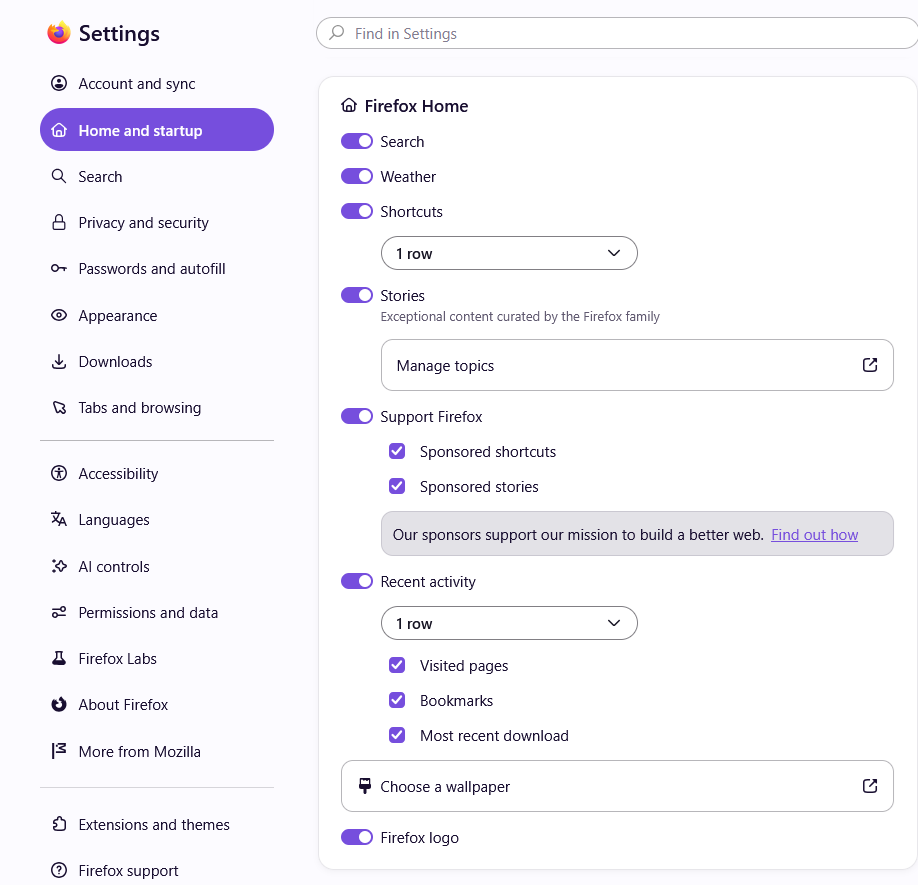
You can also change the content of your New Tab page to include Recommended stories (which is now just called "Stories") in Firefox Settings:
- Click the menu button
 and select Settings.
- Select Home and startup on the left.
- Under the Firefox Home section, find "Stories".
- Click the toggle switch from off
 to on
to on  to turn on "Stories".
Modified by AliceWyman