


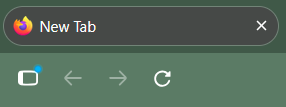
Remove permanent blue dot on the history/sidebar button

I mostly like the UI changes. However, I have a persistent bug where there is an unremovable blue alert icon on the sidebar/history button. Aside from removing this button from the UI completely, is there any way to dismiss this alert?
Second question: while in the sidebar, I navigated from History to Bookmarks. I no longer have the ability to change the sidebar away from Bookmarks. How do I get History back?
All Replies (2)
Hi Kazza, that dot means there is a notification in your tabs that is driving your attention. Same way if you have a tab with a chat open and someone messages you, you will see the dot. Do you also see the dot on the icons at the button? For your second question, I am not sure I follow - you are not able to get out of your bookmarks? The history button is not clickable?
The workarounds for the missing dropdown are in https://bugzilla.mozilla.org/show_bug.cgi?id=2076296 — and a fix in one of the next versions.