


Pages show in foreign non-english language

Hello, Im using localized (Lithuanian) version of Firefox. Several updates back, Firefox started including russian and Polish in preferred languages by default. Personally i know how to remove those for myself. However, since im managing around 300 computers in a school. This starts to become an issue. In Lithuania we only have one official language. And when pages in a school start opening in foreign (russian) language this starts to be quite annoying. I would love to keep using Firefox but i need help.
Chosen solution
Hi,
To manage this list:
- Click the menu button
 and select Settings.
- In the General panel, go down to Language.
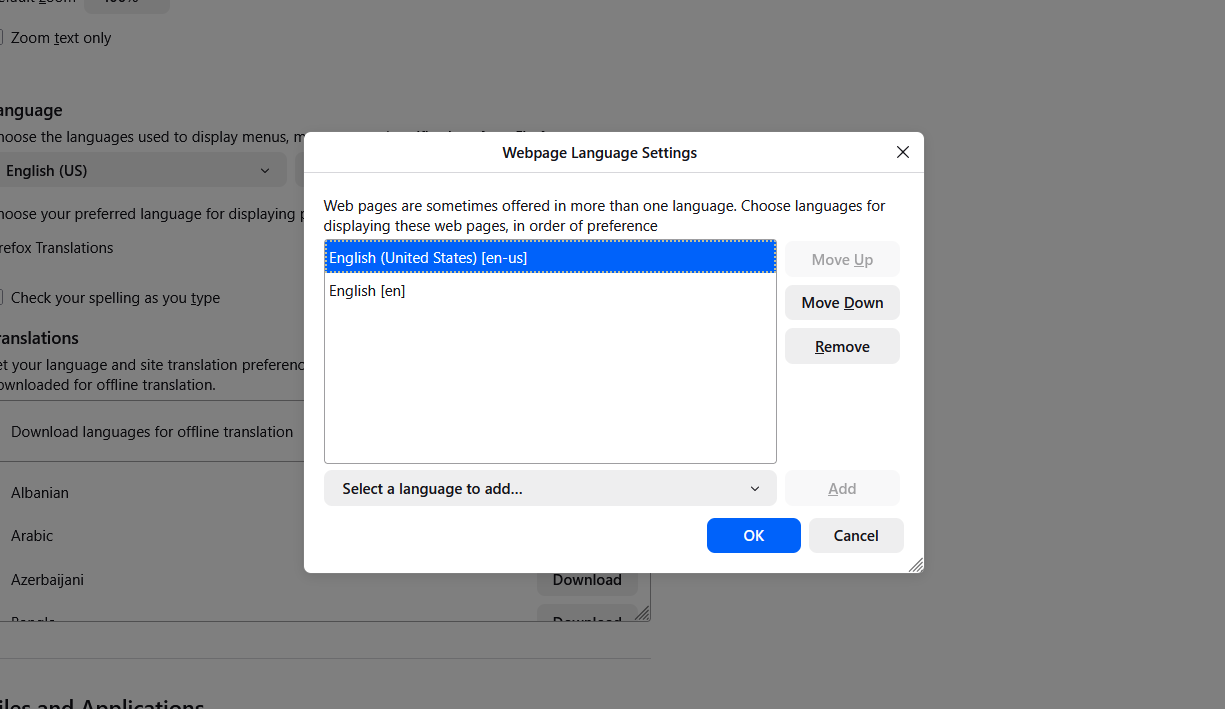
- Click Choose next to Choose your preferred language for displaying pages.
- In the popup:
- Use Add to select more languages
- Use Remove to delete unwanted entries
- Use Move Up / Move Down to change priority
- Click OK.
For computers in a domain, you can use the RequestedLocales group policy.
Read this answer in context 👍 1All Replies (2)
Clarification: since Lithuanian is not that popular in the world - all the pages show in russian language by default (even Mozilla itself). Not english. Only old people remember russian.
Modified by lietuv1s
Chosen Solution
Hi,
To manage this list:
- Click the menu button and select Settings.
- In the General panel, go down to Language.
- Click Choose next to Choose your preferred language for displaying pages.
- In the popup:
- Use Add to select more languages
- Use Remove to delete unwanted entries
- Use Move Up / Move Down to change priority
- Click OK.
For computers in a domain, you can use the RequestedLocales group policy.