


Suddenly, new emails are not being marked as new (They are marked as 'read') What's going on and how do I fix this?
Just recently, my new emails are being marked immediately as 'Read'- so old emails and new ones are indistinguishable. What's going on and How can I fix this?
All Replies (9)
Try checking in Settings>general to see if the setting for that was somehow changed.
Thanks for your response, David. However, this issue is not addressed in the settings! Now what??
Please check again. One of the settings in general is to mark messages read immediately.
Hi David,
Hmmm...can't seem to find that option in Firefox Settings. I just updated to the latest version, so I'm puzzled. Perhaps you could screenshot this option and send it to me?
Many Thanks, Rick
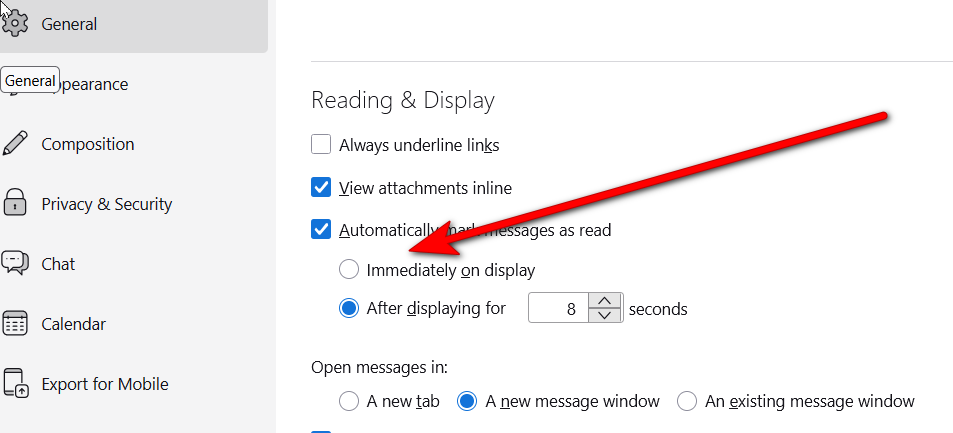
David,
Again, thanks for your efforts. I have a Mac desktop and am running Firefox 151.0.1
There is NO 'reading and display' option available in Firefox Settings. Damn!
Puzzled, Rick
Just to clarify: we're talking Thunderbird, not Firefox. Right? Please review again the Settings>general pane. Scroll slowly through it and I think there should be something similar to my screenshot. I know Macs are a bit different, that would be more different than I expected. Thank you. Are you running a beta version?
David,
NO, I'm running Firefox- and there's no option to "Mark read messages" in the settings anywhere.
Then you're on the wrong forum. If you are reading messages from your email provider website, I suggest contacting them for help. Good luck. :)