

This thread was archived.
Please ask a new question if you need help.

Solved
Archived
weird site at the top of the search bar and i can't remove it

hey all,
I've had this site that i have no recollection of visiting always there, pinned at the top of my search suggestions but i never bothered with it, till today when i decided to remove it.
I tried all the things i can think of and searched for a solution to no avail, any help is appreciated.
hey all,
I've had this site that i have no recollection of visiting always there, pinned at the top of my search suggestions but i never bothered with it, till today when i decided to remove it.
I tried all the things i can think of and searched for a solution to no avail, any help is appreciated.

Chosen Solution
You have to select Shortcuts (temporary).
Modified by TyDraniu
All Replies (3)
You can find your pinned sites on the about:home page. Just unpin or remove it.
TyDraniu said
You can find your pinned sites on the about:home page. Just unpin or remove it. See Customize items on your Firefox New Tab page.
appreciate the response but i still can't see such an option
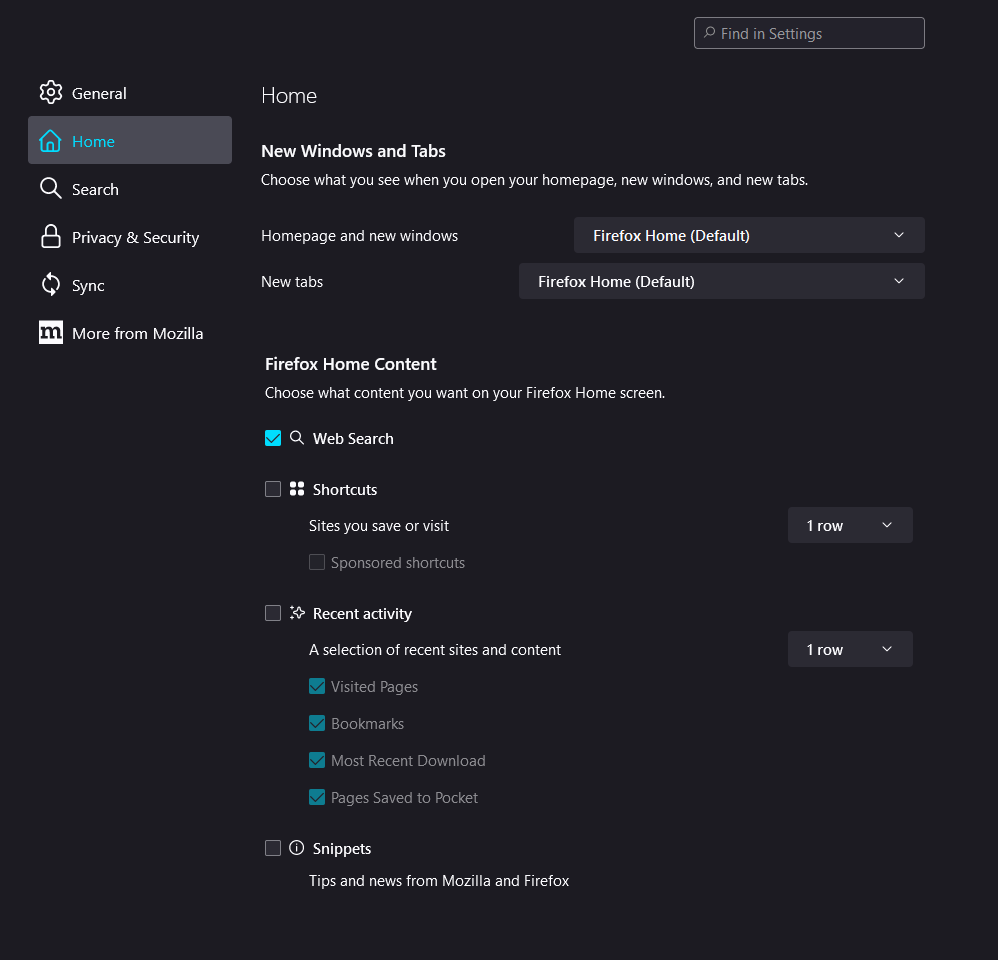
Chosen Solution
You have to select Shortcuts (temporary).
Modified by TyDraniu