

このスレッドはアーカイブに保管されました。
必要であれば新たに質問してください。

アーカイブに保管済み
sync on new computer

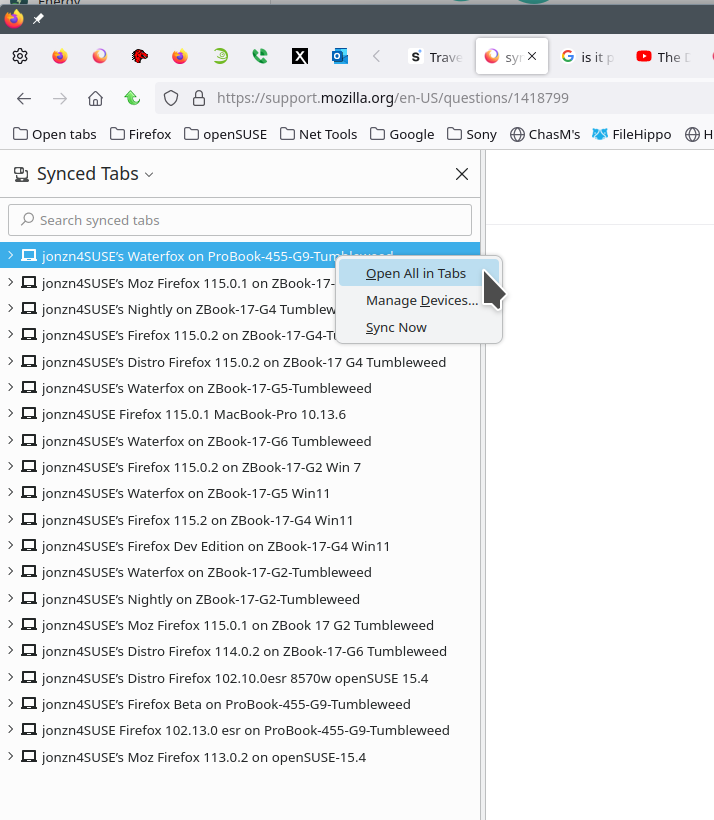
FF115 Win11 I have synced my old computer to the new one but I am unable to open all the tabs transferred from the old to the new. (Right clicking on old computer name in the sidebar does nothing)
FF115 Win11 I have synced my old computer to the new one but I am unable to open all the tabs transferred from the old to the new. (Right clicking on old computer name in the sidebar does nothing)
すべての返信 (3)

From the sidebar, you should have the option to open all in tabs from other versions or devices. see screenshot Can you post a screenshot of what you're seeing?

for me this did not work this time, even though i have it still in the synced list.
Can you show us something? Post screenshots of what you see in the sync tabs.