


I Can't Put Bookmarks on the Bookmarks Toolbar

I just bought a new computer with Windows 11 and downloaded the latest version of Firefox. I have the Bookmarks Toolbar set to always show and it is showing, but I cannot drag bookmarks to the toolbar. Nor can I create folders on the Toolbar. I can drag bookmarks and create folders in the Bookmarks Toolbar in the Bookmarks drop down menu, but they do not show up on the Toolbar itself. Help please.
選ばれた解決策
Thanks for the response. I'd already gone into customization and the "Bookmarks Toolbar Items" control was right where it was supposed to be. I ended up just uninstalling and reinstalling Firefox and started over.
この回答をすべて読む 👍 0すべての返信 (2)
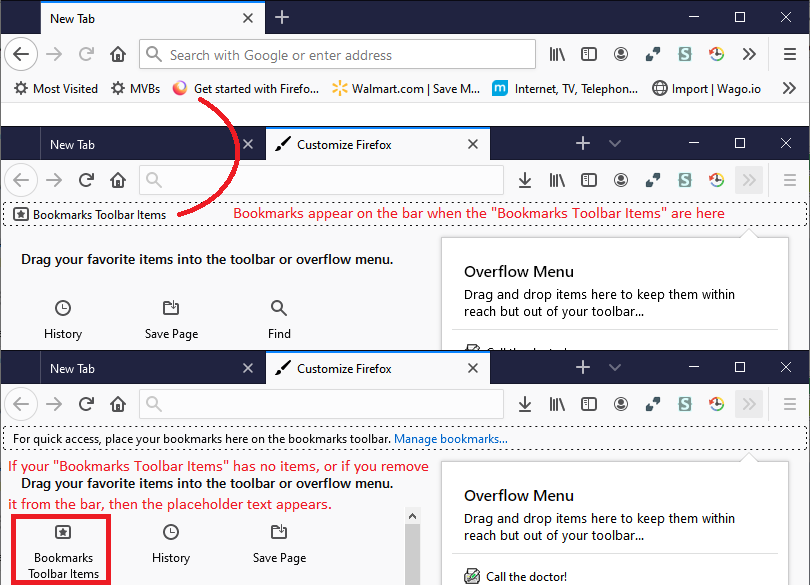
Hi, this sometimes happens. Can you open the Customize mode and see whether you can track down the "Bookmarks Toolbar Items" control -- it's a rectangle that can be moved to a different toolbar or completely off the bars. I have attached an older screenshot showing what it normally looks like.
To get into Customize: Customize Firefox controls, buttons and toolbars
選ばれた解決策
Thanks for the response. I'd already gone into customization and the "Bookmarks Toolbar Items" control was right where it was supposed to be. I ended up just uninstalling and reinstalling Firefox and started over.