


Firefox doesn't show sent messages in Gmail

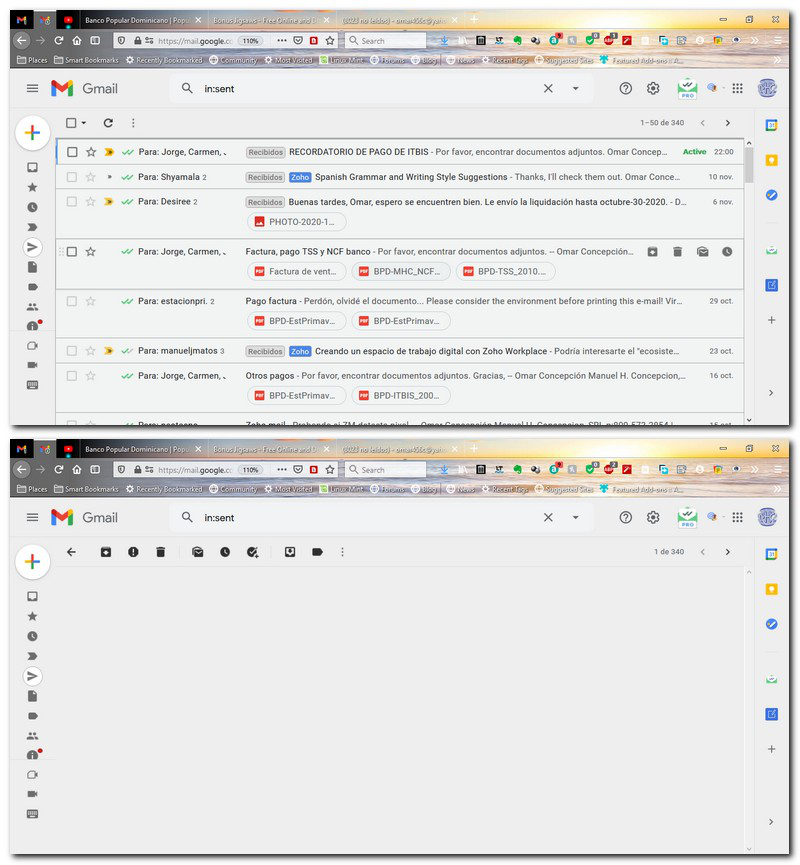
Firefox doesn't show sent messages in Gmail. Neither individual sent messages nor conversations that include sent messages. The message lists display fine, but when I try to open a message / conversation it only shows a blank page. Currently the version of Firefox on this computer is 83.0 (64-bit), although the problem occurs since the most recent versions. It only happens with Gmail. Yahoo! and AIM work fine. Doesn't happen in Chrome or Edge
選ばれた解決策
Problem solved!!! MailTrack was causing the problem. When I disabled the extension the problem was gone.
この回答をすべて読む 👍 1すべての返信 (6)
Hi Omar,
Can you try to open it again on Safe mode - Use Troubleshoot Mode in Firefox?
Hi Kiki, Excuse me for the late answer. Thank you for helping. As you suggested, I started Firefox in Safe Mode and sent messages show without problems. Before going to Safe Mode something odd happened: I opened a conversation, which opened on one of the received messages (worked right). Then, expanded the conversation in order to be able to see all messages in the conversation... and the conversation was gone, showing empty space only. Thanks again for your help.
Hi Omar,
If it works on Safe Mode, it's most likely that the glitch was caused by extension, theme, or hardware acceleration (see here).
I'd suggest disabling the extension one by one to see which one might've caused it.
Kiki, Thanks again for your help. As you'll see in the list I'm copying there's a ton of extensions. Id really appreciate you give me an idea where to start. Name Version Spanish (Spain) Dictionary 2.5 Adblock Plus - free ad blocker 3.10.1 Amazon Assistant 10.2012.22.11754 Amazon.com 1.3 Avast Online Security 20.2.501 Bing 1.2 Bookmarks Organizer 3.1.0 Docs Online Viewer 5.5.5 DuckDuckGo 1.1 Duplicate Tab 2.1 eBay 1.2 Email Tracking for Gmail - Mailtrack 6.13.0 Enhancer for YouTube™ 2.0.101 Evernote Web Clipper 7.13.8 Facebook Container 2.1.2 Free Download Manager 3.0.52 Free Download Manager extension 3.0.6 Gimp online - image editor and paint tool 2.7.12 Google 1.1 Grammar and Spell Checker — LanguageTool 3.2.3 Honey 12.4.5 Imagus 0.9.8.74 ImTranslator: Translator, Dictionary, TTS 15.66 Logitech SetPoint 6.60.90 MEGA 3.113.4 NordVPN #1 VPN Extension: Get VPN for Firefox 2.26.0 Notebook Web Clipper 2.0.4 Notes by Firefox 4.3.7 Open Link with New Tab 1 Personas Plus 2.0.3 ShareX 1.0.0 Tab Mix - Links 0.1.0 Tab Notifier 3.1.1 Tab Session Manager 6.4.0 Table to Excel 3.4 Table2Clipboard 1.6.2.0 Tabliss 2.0.3 Test Pilot 3.0.6vffecb95 Toolbox for Google Play Store™ 2.7 Video DownloadHelper 7.4.0 Wayback Machine 1.8.6 Wikipedia (en) 1.1 Wikiwand 2 extension Wikiwand: Wikipedia Modernized extension WiseStamp extension Writer - Extension & Clipper extension Zoho Sheet - Extension & Web Clipper extension English (US) Language Pack locale Español (México) Language Pack locale IObit Surfing Protection & Ads Removal extension
Thanks
選ばれた解決策
Problem solved!!! MailTrack was causing the problem. When I disabled the extension the problem was gone.
Glad that you figured it out, Omar.