Ctrl +D not working as it did
I always used Ctrl +D to bookmark a page; Firefox would offer up an option for me to select where I wanted to bookmark be placed.
Now when I use Ctrl +D Firefox is automatically placing the bookmark for me (states 'Saved in Library') and I'm having to open up 'All Bookmarks', selecting the recently added bookmark and moving it to where I want it stored.
This is very annoying and I can't find a solution to correct it.
Maybe you know how to?
すべての返信 (2)

Press <Control> D again. This should open a window with that bookmark's data inside. From here you can edit the data.
選ばれた解決策
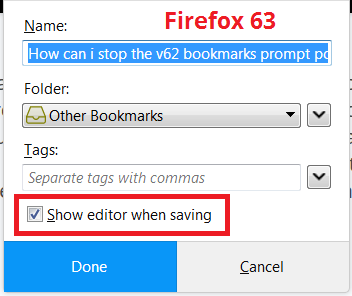
You probably need to turn on the "show the editor" setting. After adding a bookmark, the star in the address bar should turn blue. Click the star, then find the "show editor when saving" setting. Here is a screenshot from a couple versions back for reference:

Does that work?