


When I untick the default block images, it always reticks itself, how do I grant permissions for images, and not have firefox reverse it?

I keep going in to site permissions and unticking the default block image loading, and it always re ticks itself. I have managed to grant other permissions where appropriate.
It only started a few months ago, and it is only on firefox, using windows or linux
すべての返信 (9)
Separate Security Issue, please update your Flash 29.0 r0 by removing it with this tool : https://helpx.adobe.com/flash-player/kb/uninstall-flash-player-windows.html If you use it Reinstall with Flash Player Version: 30.0.0.154 Current Version https://get.adobe.com/flashplayer/otherversions/ Step 1: Select Operating System Step 2: Select A Version (Firefox, . . . .) Note: Other software is offered in the download. <Windows Only>
Hi, am brute force here, please : uninstall Firefox. Then Delete the Mozilla Firefox Folders in C:\Program Files , C:\Program Files(x86) & C:\ProgramData Then restart system. Then run Windows Disk Cleanup. (Note: This should be Pinned and run Weekly, If never done below expect 10's of gig's) Then run it again and click the button that says Cleanup System Files. Note: your Firefox Profile is saved. But you should make a back up before you do :
- https://support.mozilla.org/en-US/kb/back-and-restore-information-firefox-profiles
- https://support.mozilla.org/en-US/kb/export-firefox-bookmarks-to-backup-or-transfer
Reinstall with Current Release Firefox 61.0.2 with a Full Version Installer
Please let us know if this solved your issue or if need further assistance.

https://support.mozilla.org/en-US/kb/how-to-fix-preferences-wont-save
Note: Some software, like Advanced SystemCare with Surfing Protection, can protect files in the Firefox profile folder against changes. If you have such software then check the settings or uninstall this software.
In case you use "Clear history when Firefox closes" or otherwise clear history.
- do not clear the Site Preferences
- Options/Preferences -> Privacy & Security
Firefox will: "Use custom settings for history":
[X] "Clear history when Firefox closes" -> Settings - https://support.mozilla.org/en-US/kb/delete-browsing-search-download-history-firefox
- clearing "Site Preferences" clears exceptions for cookies, images, pop-up windows, and software installation and exception for password and other website specific data
- clearing "Cookies" will remove all selected cookies including cookies with an "Allow" exception you may want to keep
No I have never cleared site preferences, as far as I know, when I go to grant permission to load images, straight away it is re blocked. this happens as soon as I open the box again, within seconds
rexmundi1000 said
I keep going in to site permissions and unticking the default block image loading, and it always re ticks itself. I have managed to grant other permissions where appropriate.
Are you sure that under Permissions the default for 'Load Images' is set to 'Block' ? The default should be 'Allow'.
Would you please do this :
Type in the address bar about:config and press Enter (promise to be careful, if asked)
Type in the search bar and look for the preference :
permissions.default.image
The default value ('Allow') should be 1 (one)
The value for 'Block' is 2 (two)
If you need to change the value, make sure to close and restart Firefox, in order for the change to take effect.
I followed your advice, and it does say default 1 (allow), yet when I look in the box it's default block, actually now I look again it's grey and just says default, but allow is unticked.
The Allow/Block/Always Ask radio buttons will be grayed when the "Use default" checkbox is checked. Usually, the current default is indicated, but the site's permission was changed previously, that might not be a reliable indication of the default.

Do other permission changes work, meaning, are they saved and do they take effect?
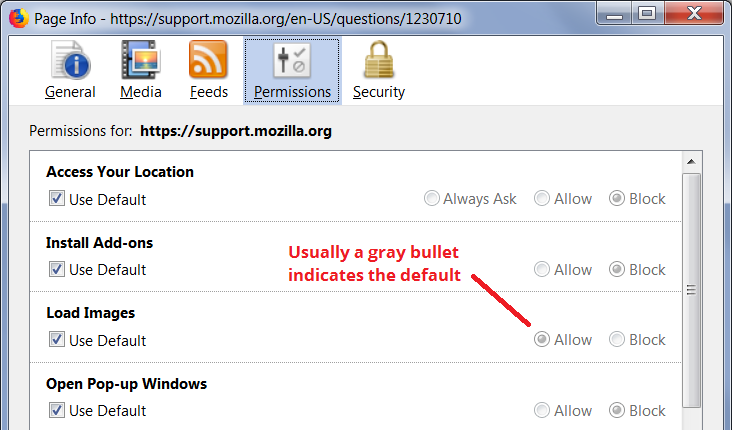
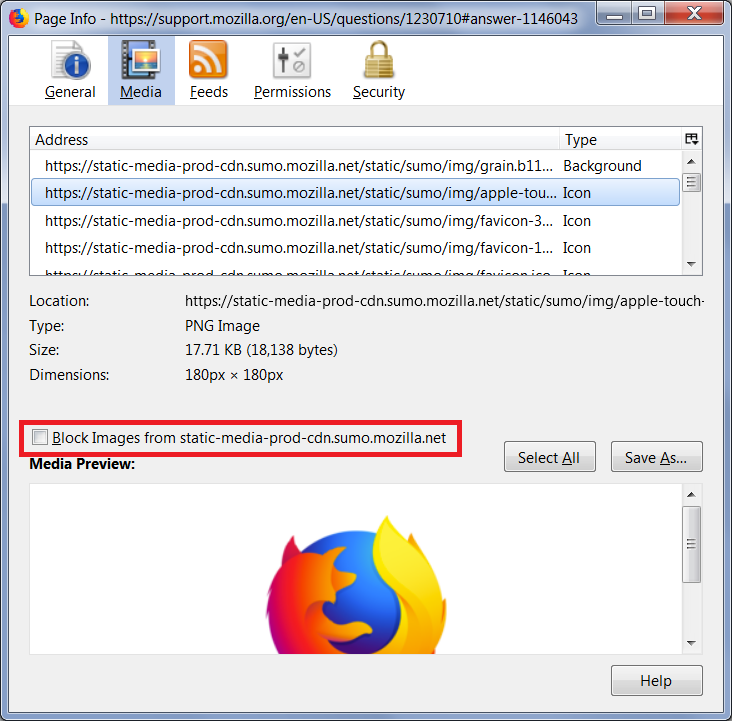
For a site that is stubbornly blocking images, could you check the Media tab of the Page Info dialog? If you click in the list, Firefox should show the image details plus the block status (a box you can uncheck). You can use the down arrow to skim through the list.

Try to rename/remove permissions.sqlite in the Firefox profile folder with Firefox closed to reset all permissions.
You can use the button on the "Help -> Troubleshooting Information" (about:support) page to go to the current Firefox profile folder or use the about:profiles page.
- Help -> Troubleshooting Information -> Profile Directory:
Windows: Show Folder; Linux: Open Directory; Mac: Show in Finder - http://kb.mozillazine.org/Profile_folder_-_Firefox