


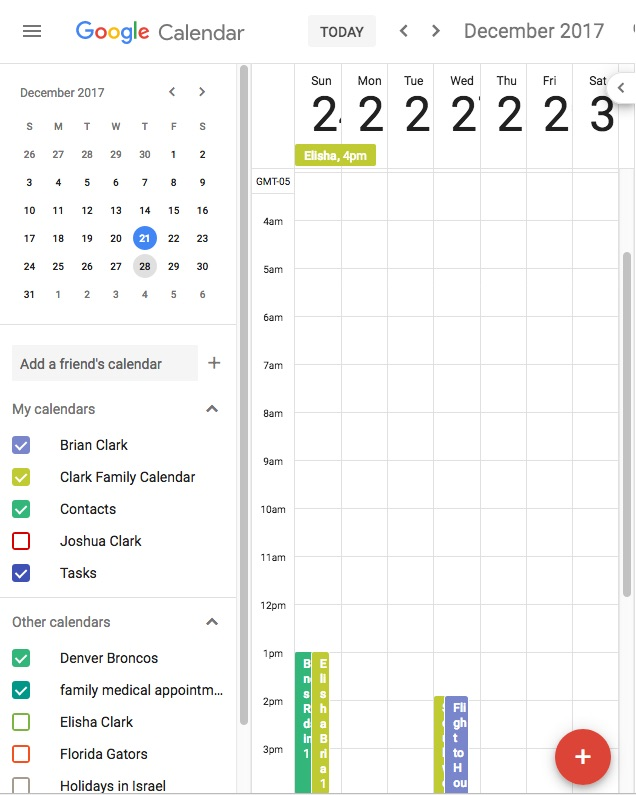
Google Calendar squashed to the left of browser window

- The screenshot tells the story.
- I've tried shutting down and restarting Firefox
- This was working a few days ago.
- This is working for a colleague with a similar setup.
Environment:
- OSX (10.11.6)
- Firefox Version: 57.0.1 (64 Bit)
Image upload doesn't seem to be working, here is an link to the screen shot: https://www.dropbox.com/s/2zv1jsfgedxntqh/Screen%20Shot%202017-12-21%20at%202.02.10%20PM.png?dl=0

この投稿は bclark_brazen により に変更されました
すべての返信 (2)
Please Refresh but do this 1st:
- https://support.mozilla.org/en-US/kb/export-firefox-bookmarks-to-backup-or-transfer
- https://support.mozilla.org/en-US/kb/back-and-restore-information-firefox-profiles
then
TEST....... If no issues then Extensions which need to be added back in 1 at a time and tested ..... Or it is your Profile : Make a new one and test ...:
If is your Profile :
- https://support.mozilla.org/en-US/kb/recovering-important-data-from-an-old-profile
- http://kb.mozillazine.org/Transferring_data_to_a_new_profile_-_Firefox
Note: Any customization will revert back to default, you will also need to reinstall Extensions.
Please let us know if this solved your issue or if need further assistance.
選ばれた解決策
Thanks, your solution worked. Via the process of elimination you recommended, I discovered the offending add-on was Foxclocks. Disabling that fixed Google calendar. I will notify the developer.