Windows 10 reached EOS (end of support) on October 14, 2025. If you are on Windows 10, see this article.

Mozilla サポートの検索

サポート詐欺に注意してください。 私たちはあなたに通話やショートメッセージの送信、個人情報の共有を求めることはありません。疑わしい行為を見つけたら「迷惑行為を報告」からご報告ください。

詳しく学ぶ
このスレッドはアーカイブに保管されました。 必要であれば新たに質問してください。
アーカイブに保管済み

Calls to Mailto links every few minutes

srs.will.edwardson

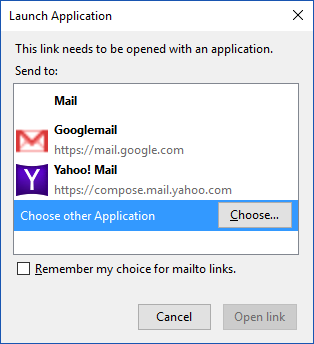
Background: This has happened ever since I actually clicked on a mailto link. I use Windows 10, so switched to the Mail app but never actually sent that email. Deleted the draft and all, closed the new tab that opened with the mailto link. But ever since then the popup to select which application to use with mailto links keeps coming up even when no new link has been clicked upon. It is really annoying and repeats itself every few minutes, except when Firefox is closed. I tried selecting one of the apps offered as options, just in case it simply wanted me to select for future reference, but now it opens instances of the app every few minutes. Please help as it is really getting in the way of my browsing experience.

Background: This has happened ever since I actually clicked on a mailto link. I use Windows 10, so switched to the Mail app but never actually sent that email. Deleted the draft and all, closed the new tab that opened with the mailto link. But ever since then the popup to select which application to use with mailto links keeps coming up even when no new link has been clicked upon. It is really annoying and repeats itself every few minutes, except when Firefox is closed. I tried selecting one of the apps offered as options, just in case it simply wanted me to select for future reference, but now it opens instances of the app every few minutes. Please help as it is really getting in the way of my browsing experience.

すべての返信 (1)

Here is a screenshot of the prompt that opens every few minutes...