


не загружаются фаилы. никакие. ничего не пишет, просто никак не реагирует когда я нажимаю загрузить.

он не то что начинает грузить и встает, а ваще даж не начинает грузить! И скачать другие браузеры я из-за этого не могу, абсолютно ничего не могу скачать, и обновления тож, что делать мне?
Tutte le risposte (4)
Hello ayya123321, try Firefox Safe Mode to see if the problem goes away. Safe Mode is a troubleshooting mode, which disables most add-ons.
(If you're not using it, switch to the Default theme.)
- On Windows you can open Firefox 4.0+ in Safe Mode by holding the Shift key when you open the Firefox desktop or Start menu shortcut.
- Or open the Help menu and click on the Restart with Add-ons Disabled... menu item while Firefox is running.
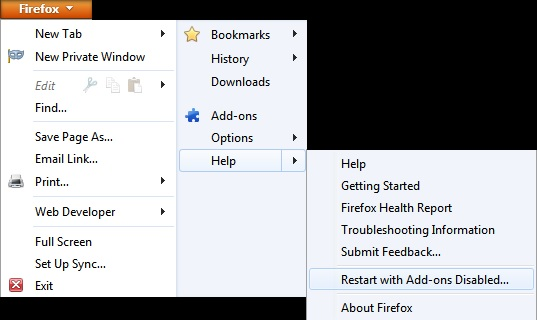
Once you get the pop-up, just select "'Start in Safe Mode"
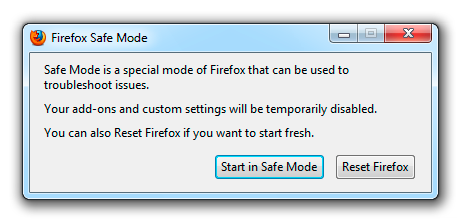
If the issue is not present in Firefox Safe Mode, your problem is probably caused by an extension, and you need to figure out which one. Please follow the Troubleshoot extensions, themes and hardware acceleration issues to solve common Firefox problems article for that.
To exit the Firefox Safe Mode, just close Firefox and wait a few seconds before opening Firefox for normal use again.
When you figure out what's causing your issues, please let us know. It might help other users who have the same problem.
Thank you.
Класс. Я конечно ориентируюсь в английском, но не на столько. Если вы не можете помочь русскоязычным пользователям, тогда и не распространяйте свою прогу на Россию. Спасибо за внимание.
See : Окно Безопасного режима
and select : Щелчок по Запустить в Безопасном Режиме временно
then see : Решение проблем в Безопасном режиме
thanks again