

Questa discussione è archiviata.
Inserire una nuova richiesta se occorre aiuto.

Archiviato
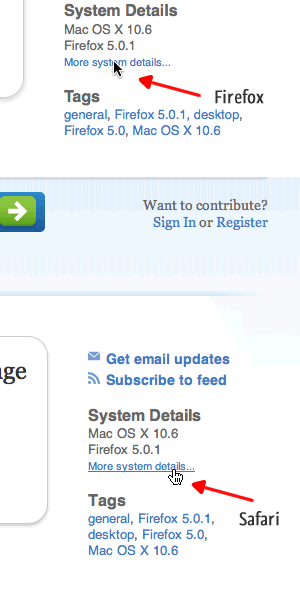
Links don't appear as links, the pointer doesn't change to a finger and there's no hover effect

If I hover over a link, I expect the pointer to change to a finger and any hover effects show up (especially tool tips)
This used to work and is ok in Safari
If I hover over a link, I expect the pointer to change to a finger and any hover effects show up (especially tool tips)
This used to work and is ok in Safari
Tutte le risposte (3)
Here's a screenshot to see what I mean ....
-> click Firefox button and click Exit/Quit
Start Firefox in Safe Mode by Holding down the Option key while starting your Mozilla application.
As an alternate method, go to Utilities (in the Applications folder) and open Terminal, then run:
/Applications/Firefox.app/Contents/MacOS/firefox-bin -safe-mode
-> Firefox Safe Mode window will appear -> DON'T SELECT ANY OPTIONS, just click Continue in Safe Mode
Does it still happen when you are Browsing in Safe Mode??
It's exactly the same ..