Pinning websites
Hey, thank you for reading this.. I'm really confused to what these are. Every time I click the firefox search bar, other sites that I've been to pop up. Is it just the recent search history..? Sorry if I'm just being silly. I deleted the search history for the discord website but it still pops up when i click on the search bar. I just don't get what that means, and what the grey icon means. If you could explain it to me that would be great
thank you Alec

Soluzione scelta
Hi Simonismycat, when you click the address bar in Firefox 75 and later, by default, Firefox displays your first 8-10 Top Sites from the Firefox Home / new tab page. That is where the pins come from.
You can edit that list by opening those pages -- here are the direct addresses you can paste in the address bar and press Enter to load if they don't come up automatically when you click Home or open a new tab:
- about:home
- about:newtab
-- and this article has tips on how to edit that section: Customize your Firefox New Tab page.
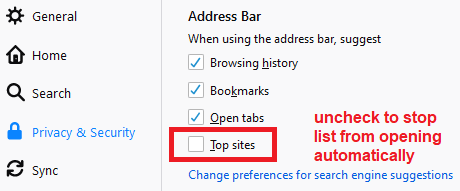
By the way, if you don't find this automatically displayed list useful, you can turn it off. There is a checkbox for that on the Options page, Privacy & Security panel, "Address bar" section:

Tutte le risposte (1)
Soluzione scelta
Hi Simonismycat, when you click the address bar in Firefox 75 and later, by default, Firefox displays your first 8-10 Top Sites from the Firefox Home / new tab page. That is where the pins come from.
You can edit that list by opening those pages -- here are the direct addresses you can paste in the address bar and press Enter to load if they don't come up automatically when you click Home or open a new tab:
- about:home
- about:newtab
-- and this article has tips on how to edit that section: Customize your Firefox New Tab page.
By the way, if you don't find this automatically displayed list useful, you can turn it off. There is a checkbox for that on the Options page, Privacy & Security panel, "Address bar" section: