


Windows 10 reached EOS (end of support) on October 14, 2025. If you are on Windows 10, see this article.

Cerca nel supporto

Attenzione alle mail truffa. Mozilla non chiederà mai di chiamare o mandare messaggi a un numero di telefono o di inviare dati personali. Segnalare qualsiasi attività sospetta utilizzando l'opzione “Segnala abuso”.

Ulteriori informazioni

Questa discussione è archiviata. Inserire una nuova richiesta se occorre aiuto.

Firefox using too much memory despite set to 1 process.

  • 1 risposta
  • 1 ha questo problema
  • 135 visualizzazioni
  • Ultima risposta di cor-el
  • Archiviato

So a while ago, or better years ago, Firefox and other browsers for some reason changed to a lot of processes instead of a single one. I never really cared about it, but now I want to know. Why is the browser using so much memory? I can't understand how a single tab of, let's say, Youtube on low-quality, generally 360p, is using more than 2 GB of my Systems RAM. I looked up a setting that changes the browser to 1 process, and it helps if I do not have a lot of tabs open. But enabling the setting does nothing. I still have around 6 to 8 processes in my task manager and their total memory usage simply doesn't justify it. If I play a more or less a few-years-old game, I get less memory usage from it than from one tab with a video on it. Heck, actual movies in my video player take much less memory. Can someone explain to me how this is happening and how I can circumvent the 6-8 processes, which pop-up despite me changing it to 1 process in the settings? Excuse my German screenshot, but it should be understandable that I set it to 1 content process. Also it shows how my browser uses 1 entire Gigabyte of RAM just for this website. Why and how?
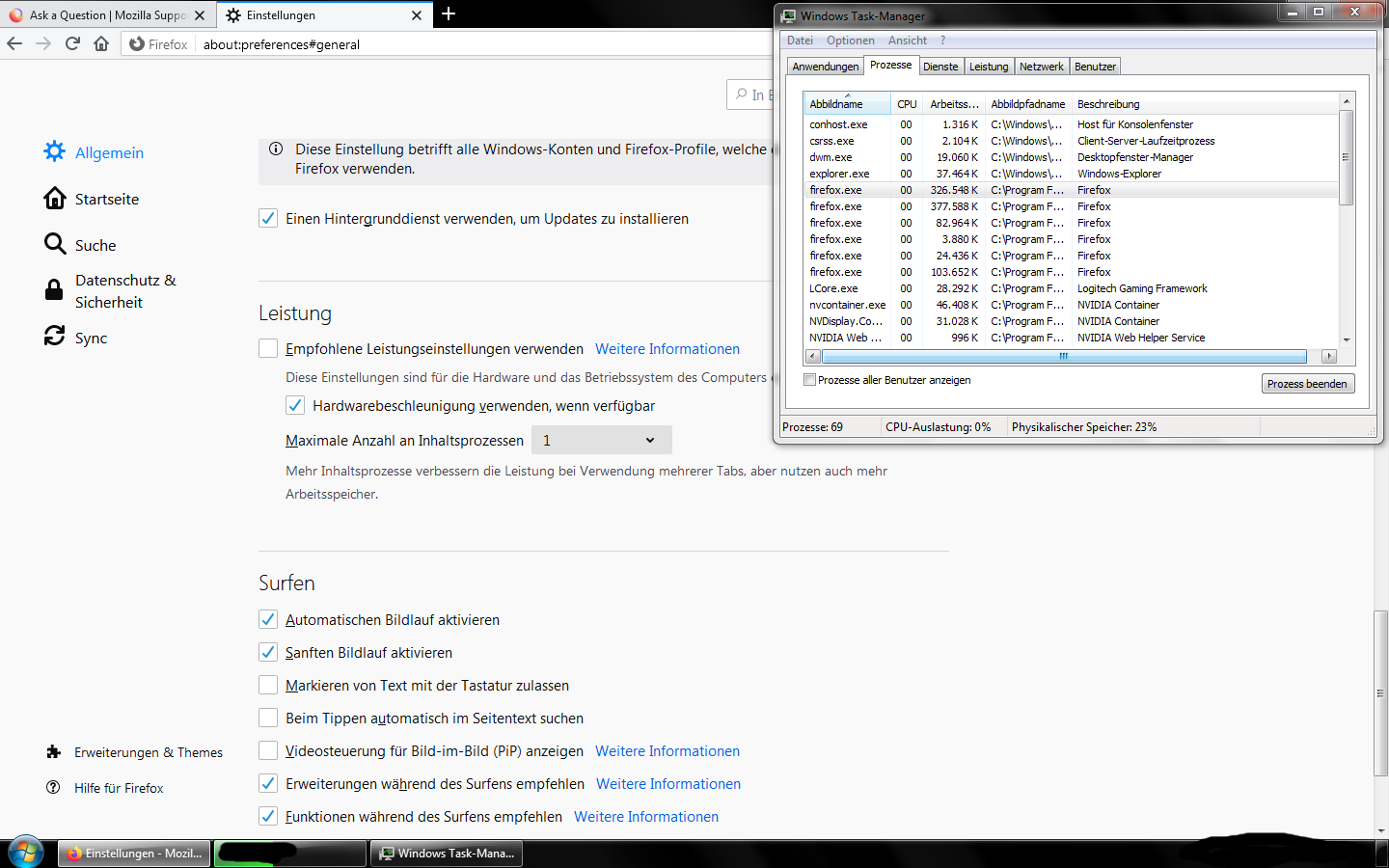
So a while ago, or better years ago, Firefox and other browsers for some reason changed to a lot of processes instead of a single one. I never really cared about it, but now I want to know. Why is the browser using so much memory? I can't understand how a single tab of, let's say, Youtube on low-quality, generally 360p, is using more than 2 GB of my Systems RAM. I looked up a setting that changes the browser to 1 process, and it helps if I do not have a lot of tabs open. But enabling the setting does nothing. I still have around 6 to 8 processes in my task manager and their total memory usage simply doesn't justify it. If I play a more or less a few-years-old game, I get less memory usage from it than from one tab with a video on it. Heck, actual movies in my video player take much less memory. Can someone explain to me how this is happening and how I can circumvent the 6-8 processes, which pop-up despite me changing it to 1 process in the settings? Excuse my German screenshot, but it should be understandable that I set it to 1 content process. Also it shows how my browser uses 1 entire Gigabyte of RAM just for this website. Why and how?
Immagini allegate

Tutte le risposte (1)