


After 32 bit to 64 bit upgrade, Firefox ICON is gone from start menu
I moved my old Firefox from XP PC to Windows 10 PC, got the bookmarks (etc) and then followed the article in the support forum to upgrade from 32 bit ESR to 64 bit version, 66.0.1. Firefox works perfectly, from desktop icon, but there is no mention or icon in the start menu. When I right click the desktop icon and click on "Pin to Start menu", a blank box appears on the large start menu with W-308046B0AF4A39CB inside the box. Clicking on the box does not work. Using firefox from the desktop icon works perfectly
Soluzione scelta
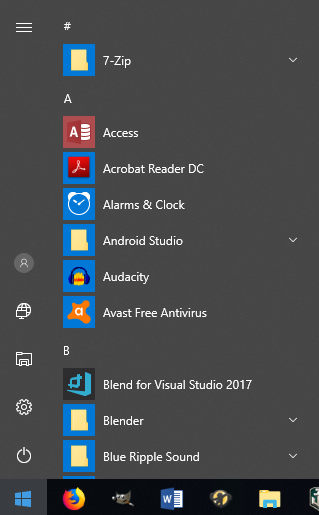
I assume you are talking about the list of apps that appear on your start menu (see my example screenshot)?
If so, these icons and folders are located in this folder:
C:\ProgramData\Microsoft\Windows\Start Menu\Programs
If you copy and paste the desktop shortcut into that folder, it should then appear in your Windows 10 apps list.
Hope this helps.
Leggere questa risposta nel contesto 👍 1Tutte le risposte (2)
Soluzione scelta
I assume you are talking about the list of apps that appear on your start menu (see my example screenshot)?
If so, these icons and folders are located in this folder:
C:\ProgramData\Microsoft\Windows\Start Menu\Programs
If you copy and paste the desktop shortcut into that folder, it should then appear in your Windows 10 apps list.
Hope this helps.
Thank you, worked perfectly