72.21.91.29 - Odd connection

Hello, today i noticed that when Firefox is stared it forms a connection to 72.21.91.29. The way i found this out was by running netstat -o, taking the process ID, and the comparing that number to task manger, its Firefox. The extensions installed are HTTPS everywhere and ublock orgin. The Firefox version is 61.0.2, as some background i noticed this problem when i had recently installed HTTPs everywhere on a new machine. Is this normal?, is anyone else seeing this connection with HTTPS everywhere?
Soluzione scelta
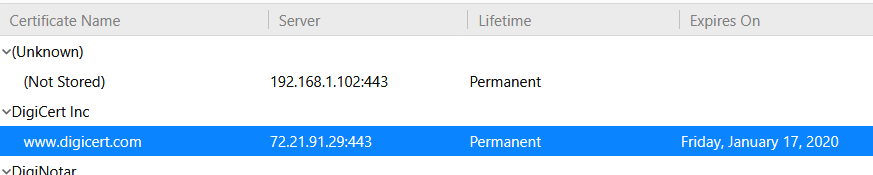
Upon looking into this further it seems like a certificate from digicert doing something
Leggere questa risposta nel contesto 👍 0Tutte le risposte (16)
Hi. please note what you agreed to when installed https://addons.mozilla.org/firefox/addon/https-everywhere/ Will find it under permissions on the page.
Will be more - or - less for all other Extensions. Nothing is Free though sometimes the info is used to determine what is going on.
So this isn't some sort of highjack?. I was alarmed when i saw this, never seen it before.
Though if use Arin.net and whois from registry authority you will find that address goes to Verizon https://whois.arin.net/rest/net/NET-72-21-80-0-1/pft?s=72.21.91.29
No, please go to the page and see what permissions you agreed to to use HTTPS Everywhere and same for UBlock Origin.
Right!!! thats why its so strange
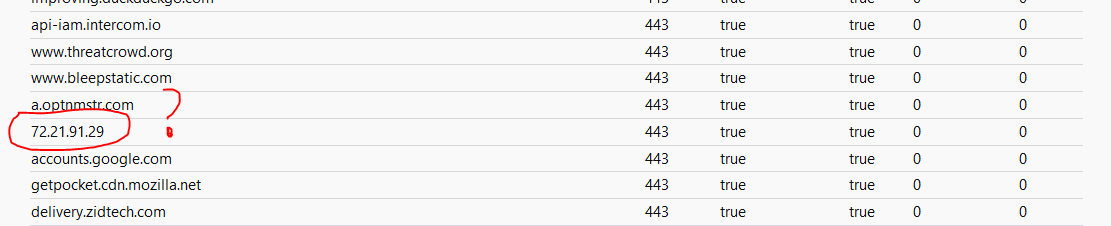
You can check the DNS tab on the about:networking page for more detail.
I does not have a DNS server, it just says it operates on port 443
Note that you need to look at the DNS tab and not at the default HTTP tab.
Right , theres no DNS server
Pic of the IP
FirefoxUser231 said
Pic of the IP
This keeps getting weirder look at this: https://www.abuseipdb.com/check/72.21.91.29
FirefoxUser231 said
FirefoxUser231 saidPic of the IPThis keeps getting weirder look at this: https://www.abuseipdb.com/check/72.21.91.29
If you are concerned and have a decent Firewall block the address. If not figure out what you are going to do : https://who.is/whois-ip/ip-address/72.21.91.29 As for now this is your issue to figure out and solve since are so interested. Volunteer Support here is not Abuse, nor Technical, nor a reporting site. If after contacting Verizon and have a issue you can put go to the Extension page of the program and there is a abuse link there to report verified abuse.
Soluzione scelta
Upon looking into this further it seems like a certificate from digicert doing something