


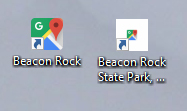
Bookmarks saved to my desktop show as a white box with a very tiny icon image in the center.
At some point in the past year, a FF upgrade changed the way that the default icon image is assigned when I save a link to my desktop. Formerly, the icon image would take up the square available. Now the square is a white background with a tiny version of the icon image in the center.
This may seem like a minor (should I say small?) matter, but the tiny version is nearly useless as a visual cue as to the destination of the link. Is there some way to return to the old type of icons?
Also, if I use Chrome or MSIE to save a bookmark to the desktop, I get the full-size version. See comparison attached.
Tutte le risposte (2)
Hi there is a open bug report here : https://bugzilla.mozilla.org/show_bug.cgi?id=1293043 Please do not post in it.
You do a global thing in Win10 and suggest that you do, toogle everything and give the whole works a jolt as it maybe Win 10 that is the issue. Then switch things back. https://www.howto-connect.com/change-icons-and-text-size-on-windows-10/ or have you used Customize to Compact Firefox Icons. Not sure if is what the issue is but worth exploring. https://www.howtogeek.com/333110/how-to-customize-firefox-quantum-and-remove-the-white-space-around-the-title-bar/
Thanks, Pk,
Judging by how long it has remained in the "bug" category, it certainly shows that the bug is now a feature. My question at this point is: Why on earth is the tiny rendering of the icon somehow preferable to the larger original?