


Windows 10 reached EOS (end of support) on October 14, 2025. If you are on Windows 10, see this article.

Cerca nel supporto

Attenzione alle mail truffa. Mozilla non chiederà mai di chiamare o mandare messaggi a un numero di telefono o di inviare dati personali. Segnalare qualsiasi attività sospetta utilizzando l'opzione “Segnala abuso”.

Ulteriori informazioni

Questa discussione è archiviata. Inserire una nuova richiesta se occorre aiuto.

Calendar error after Lightning update

  • 4 risposte
  • 3 hanno questo problema
  • 86 visualizzazioni
  • Ultima risposta di YReginster
  • Archiviato

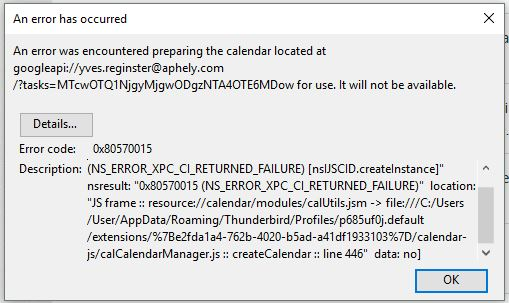
TB 54.1.1 on Linux after last update (22 May 17?) An error was encountered preparing the calendar located at googleapi://xxxx@gmail.com/?calendar=yyyygmail.com for use. It will not be available. [Exception... "Component returned failure code: 0x80570015 (NS_ERROR_XPC_CI_RETURNED_FAILURE) [nsIJSCID.createInstance]" nsresult: "0x80570015 (NS_ERROR_XPC_CI_RETURNED_FAILURE)" location: "JS frame :: resource://calendar/modules/calUtils.jsm -> file:///zzzz.default/extensions/%7Be2fda1a4-762b-4020-b5ad-a41df1933103%7D/calendar-js/calCalendarManager.js :: calCalendarManager.prototype.createCalendar :: line 446" data: no] Any ideas?

TB 54.1.1 on Linux after last update (22 May 17?) An error was encountered preparing the calendar located at googleapi://xxxx@gmail.com/?calendar=yyyygmail.com for use. It will not be available. [Exception... "Component returned failure code: 0x80570015 (NS_ERROR_XPC_CI_RETURNED_FAILURE) [nsIJSCID.createInstance]" nsresult: "0x80570015 (NS_ERROR_XPC_CI_RETURNED_FAILURE)" location: "JS frame :: resource://calendar/modules/calUtils.jsm -> file:///zzzz.default/extensions/%7Be2fda1a4-762b-4020-b5ad-a41df1933103%7D/calendar-js/calCalendarManager.js :: calCalendarManager.prototype.createCalendar :: line 446" data: no] Any ideas?

Tutte le risposte (4)

Edit Lightning 5.4 update 24 May 17

I have the problem too.
I did solve it but I cannot be sure how. I think it was as simple as updating gContactSync in Extensions.

I simply went back to previous version of Thunderbird. de-install Thunderbird, re-install and install again Provider for Google Calendar.

My issue is now solved.