


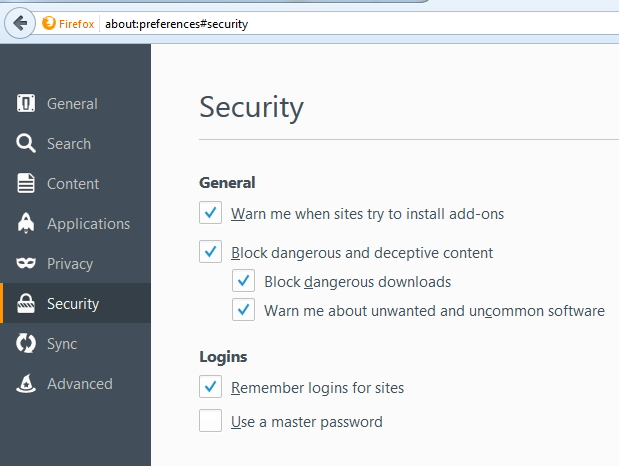
Security>Logins>Remember Logins for Sites re-enables itself every time FF starts
I never want FF to remember my logins. The first thing I do is un-check the Security>Logins>Remember Logins for Sites. However, whenever I restart FF this check box is checked off again and FF asks me if I want to remember logins.
I've uninstalled/reinstalled FF. I've tried this on a different laptop. I've created a new FF profile and deleted the old. Nothing works. This is the sole reason why I end up having to go back to Chrome for my daily browser.
Win 7
Tutte le risposte (3)
hi brett611, do you have Trend Micro PasswordManager or Dashlane installed in your list of programs in the system control panel by any chance? if so, please uninstall it from there if you're not using it...
Thanks! I don't use Trend Micro Pswrd Manager or Dashlane...use 1Password.
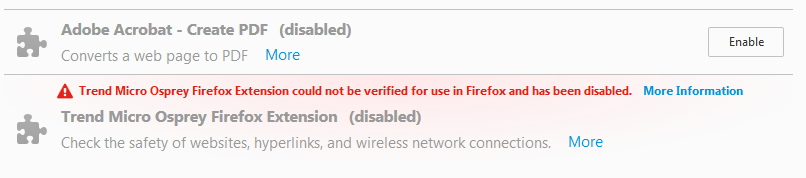
Additionally this is my work laptop and they use Trend Micro OfficeScan, which I cannot disable. There is a trend micro extension but it's disabled

https://support.mozilla.org/en-US/kb/how-to-fix-preferences-wont-save
Note: Some software, like Advanced SystemCare with Surfing Protection, can protect files in the Firefox profile folder against changes. If you have such software then check the settings or uninstall this software.