


Message body displays as "View Source"

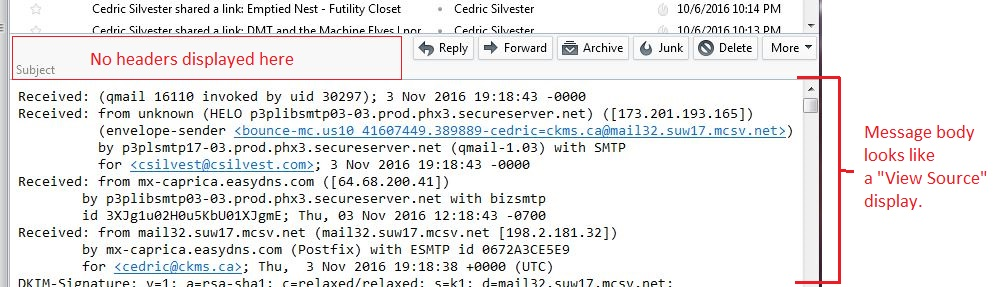
Approx 1 week ago, for no apparent reason, some messages are showing as "View Source" in the body. See attached screen snip.
I made no changes to Thunderbird settings.
The normal headers "From", "To", are missing; the "Subject" is empty.
Not every message displays like this; approx 1/2 are correct, the other half are "View Source". No obvious correlation to sender, attachment or not, etc. Seems random.
I have tried all the combinations of View -> Headers, View -> Message Body As, etc.; nothing changes.
Thunderbird 45.4.0, Windows 7 Professional.
Thanks!
Tutte le risposte (8)

If you haven't done so for a while, i'd recommend you back up first.
Then I'd suggest you repair the affected folder. Right-click, Properties, Repair Folder.
Thanks, Zenos. Tried that, no better.
Restart Thunderbird with add-ons disabled (Thunderbird Safe Mode). On the Help menu, click on "Restart with Add-ons Disabled". If Thunderbird works like normal, there is an Add-on or Theme interfering with normal operations. You will need to re-enable add-ons one at a time until you locate the offender.
Thanks, Matt. I should have mentioned in my original post that this happens in normal or Safe Mode.
Just restarted again, switched to normal, no better
Then restarted again in Safe Mode; no better.
Skilled with the file system? I yes speak up.
If no; download thunderdfix and run it. It is a rubbish program, but it automates the task in deleting MSF files from Thunderbird when weirdness sets in.
Matt: Skilled enough... and have a backup so no worries...
This is best done from a command prompt. you can do it in windows but it is tedious. Close Thunderbird
So windows key + R cmd and enter type
cd %appdata%\Thunderbird\profiles
Enter
del *msf /s
Enter
close the command prompt and restart Thunderbird
Matt: all *.msf files deleted. On restart, same problem.
Here's an interesting tidbit. I did a "View Source" on a message and saved it as a file; then I "select all" in the message display in Thunderbird, copy & pasted into a second file. On diff'ing the 2 files, there is a difference:
--- S:/docs/thunderbird-1-cp-from-inbox-display.txt Fri Nov 4 15:19:32 2016 +++ S:/docs/thunderbird-1-viewsource.txt Fri Nov 4 15:18:42 2016 @@ -0,0 +1,7 @@ +From - Fri Nov 04 00:23:42 2016 +X-Account-Key: account5 +X-UIDL: 1478233024.635449.p3plgemini17-10.prod.phx.2354431744 +X-Mozilla-Status: 0001 +X-Mozilla-Status2: 00000000 +X-Mozilla-Keys: + @@ -42,0 +50 @@ Email: lurie.10.9t@mail.ru +
So the "View Source" version has 6 lines (+ a blank line) at the start of the file.
Edit to add: doing same steps on another email shows same 7 lines are in the View Source version but NOT in the displayed version. One of the 7 lines is different (the X-UIDL: line differs).
Edit2: of the 24 emails I rec'd overnight, 18 were displayed correctly, 6 were displayed "View Source" like.
Modificato da csilvest il