


Address bar in 44.0 shows a "ghost" forward-slash character
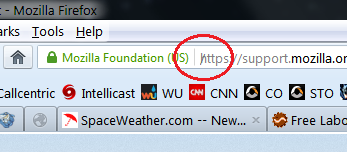
Since the update to Firefox 44.0, my address bar has been showing a "ghost" forward-slash character, "/". The "ghost" character is gray in color, matching the color of most of the actual URL. Firefox shows this overlaid atop the first character of every URL at every website. It also overlays the beginning of the "Search or enter address" message that is displayed if I select the URL text and press Delete to clear the text. It cannot be selected with the cursor, nor does it appear in the clipboard if I type "Ctrl-A" and "Ctrl-C" within the address bar.
Note that it does not interfere with the operation of Firefox in any way. It's just a visual glitch.
I am attaching a snippet of a screenshot to illustrate the problem.
This is Firefox 44.0 on Windows 7 Home Premium 64-bit.
Soluzione scelta
Never mind, it turned out to be a bug in an old extension.
Leggere questa risposta nel contesto 👍 1Tutte le risposte (5)
Soluzione scelta
Never mind, it turned out to be a bug in an old extension.
Hmm, I don't have that. Perhaps one of your extensions is not fully compatible with Firefox 44. Have you already checked them for updates on the Add-ons page? Either:
- Ctrl+Shift+a
- "3-bar" menu button (or Tools menu) > Add-ons
In the left column, click Extensions. Then find the "gear" button above the list on the right side, click that, "Check for Updates".
Ha, you beat me to it.

That was very good work. Well Done. Please flag your last post as Solved Problem so others will know.
Specifically, it was the "LocationBar2" (actually "squared", I don't know how to enter the superscript here) add-on. It was pretty outdated, I guess I shouldn't be surprised.