


A language dictionary is added to add-ons but is not used in spellchecking

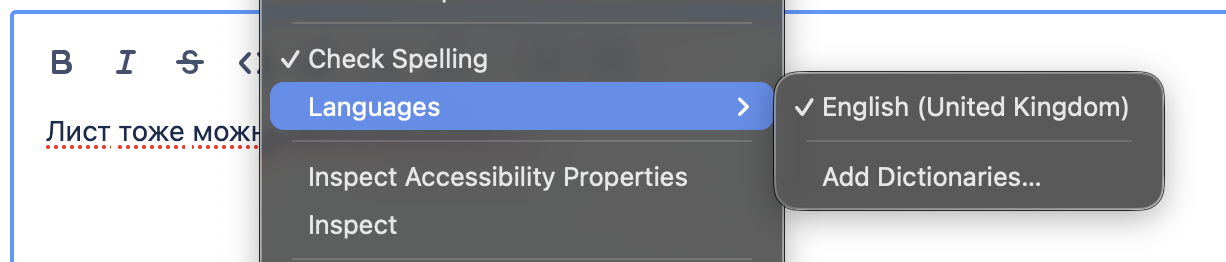
I am trying to get Russian language spellchecked.
I went to this url: https://addons.mozilla.org/en-GB/firefox/addon/russian-ru-language-pack/, installed the pack. Re-opened the browser. But nothing seemed to changed.
I use English locale.
Version 152.0.1 Build ID 20260617213557 Update Channel release User Agent Mozilla/5.0 (Macintosh; Intel Mac OS X 10.15; rv:152.0) Gecko/20100101 Firefox/152.0 OS Darwin 25.5.0 Darwin Kernel Version 25.5.0: Mon Apr 27 20:38:00 PDT 2026; root:xnu-12377.121.6~2/RELEASE_ARM64_T8103
Solusi Terpilih
dmitry.novoselov said
Figured out that I installed a language pack instead of a dictionary. Installed the dictionary, now spellchecking is fine. Actually, I thought that installing the language pack in effect installs all the dictionaries.
https://support.mozilla.org/en-US/kb/how-do-i-use-firefox-spell-checker https://support.mozilla.org/en-US/kb/use-firefox-another-language
The language Packs are a way to have say one Firefox install but be able to change the language of the menus and such between two or more languages.
It explains on top of https://addons.mozilla.org/firefox/language-tools/
Installing a dictionary add-on will add a new language option to your spell-checker, which checks your spelling as you type in Firefox. Language packs change your browser’s interface language, including menu options and settings.
Diperbarui oleh James pada
Semua Balasan (3)
Figured out that I installed a language pack instead of a dictionary. Installed the dictionary, now spellchecking is fine.
Actually, I thought that installing the language pack in effect installs all the dictionaries.
Diperbarui oleh dmitry.novoselov pada
This is a language pack, you need a dictionary -> https://bugzilla.mozilla.org/show_bug.cgi?id=2040224
Solusi Terpilih
dmitry.novoselov said
Figured out that I installed a language pack instead of a dictionary. Installed the dictionary, now spellchecking is fine. Actually, I thought that installing the language pack in effect installs all the dictionaries.
https://support.mozilla.org/en-US/kb/how-do-i-use-firefox-spell-checker https://support.mozilla.org/en-US/kb/use-firefox-another-language
The language Packs are a way to have say one Firefox install but be able to change the language of the menus and such between two or more languages.
It explains on top of https://addons.mozilla.org/firefox/language-tools/
Installing a dictionary add-on will add a new language option to your spell-checker, which checks your spelling as you type in Firefox. Language packs change your browser’s interface language, including menu options and settings.
Diperbarui oleh James pada