

Utas ini telah diarsipkan.
Silakan membuat pertanyaan baru jika Anda membutuhkan bantuan.

Solved
Diarsipkan
Changing mailto to yahoo

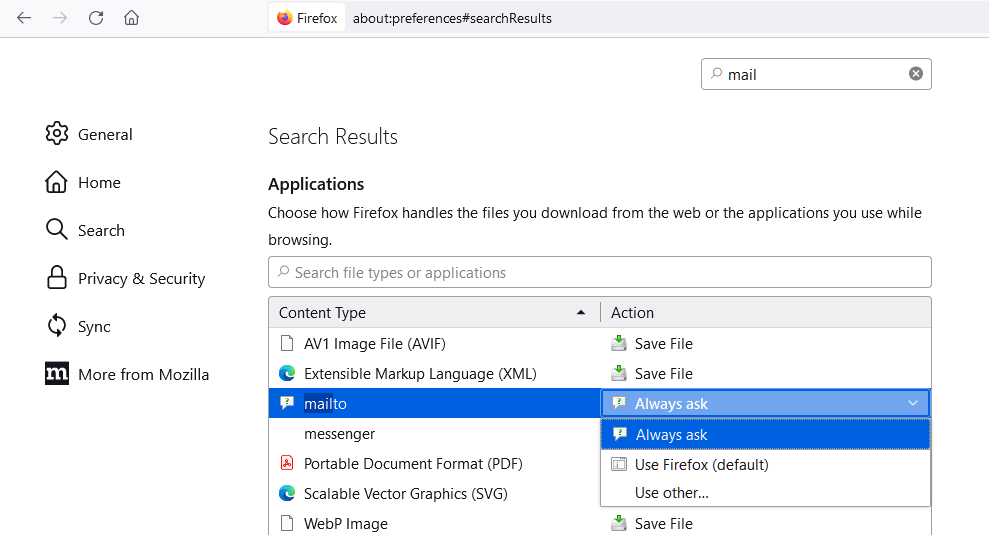
I am able to find the mailto setting easily. However, there are no clients listed to choose from, no gmail, yahoo, nothing. If I click "choose other" I'm expected to choose an application from my computer. I just want to be able to click a mailto link and have it go out through a new tab via my existing, free, yahoo mail account.
I am able to find the mailto setting easily. However, there are no clients listed to choose from, no gmail, yahoo, nothing. If I click "choose other" I'm expected to choose an application from my computer. I just want to be able to click a mailto link and have it go out through a new tab via my existing, free, yahoo mail account.
Semua Balasan (2)
James Craw said
I am able to find the mailto setting easily. However, there are no clients listed to choose from, no gmail, yahoo, nothing. If I click "choose other" I'm expected to choose an application from my computer. I just want to be able to click a mailto link and have it go out through a new tab via my existing, free, yahoo mail account.
https://support.mozilla.org/en-US/kb/change-program-used-open-email-links
Solusi Terpilih
Hi James Craw, in recent updates to Firefox, usually Gmail is listed but Yahoo is not. If you don't find another solution and you trust me, you can download an older handlers.json file and replace yours with that one. This thread has the info:
https://support.mozilla.org/en-US/questions/1374655#answer-1498538