


I have lost all my history

I have lost all my browsing history, how can I get it returned to how it was
I have lost all my browsing history, how can I get it returned to how it was
Solusi terpilih
Hello,
You can choose from different search providers such as Google or Bing when you search the Internet using Firefox. To change the default search engine that Firefox uses:
- Click the menu button
 and choose Settings.
- In older Firefox versions, choose "Options" (Windows) or "Preferences" (Mac, Linux) instead.
- Select Search in the left pane.
- In the Search settings panel that opens, go to the Default Search Engine section.
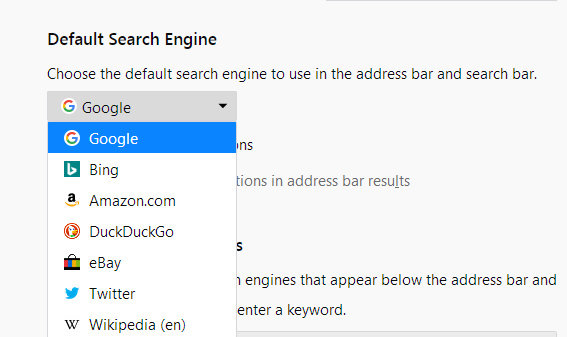
- Select a different search engine from the drop-down menu:
For more information, see Manage Firefox search settings.
Let us know if this helps!
Baca jawaban ini dalam konteks 👍 0Semua Balasan (1)
Solusi Terpilih
Hello,
You can choose from different search providers such as Google or Bing when you search the Internet using Firefox. To change the default search engine that Firefox uses:
- Click the menu button and choose Settings.
- In older Firefox versions, choose "Options" (Windows) or "Preferences" (Mac, Linux) instead.
- Select Search in the left pane.
- In the Search settings panel that opens, go to the Default Search Engine section.
- Select a different search engine from the drop-down menu:
For more information, see Manage Firefox search settings.
Let us know if this helps!