


Address bar history problem

For some reason, I cannot clear single items from the address bar, nor could I find a three-dot button anywhere in the address bar itself, nor even in the search bar.
Must I complain at length about this problem further?
This feature seems to have been removed a while back, and I would very much prefer its return.
HELLO?!?
MODS?!?
ADMINS?!?
AM I GETTING MYSELF THROUGH TO ANYONE OF YOU SOMEHOW?!?!?!?!?!?!?
Wšě wotmołwy (7)
Thanks for your post. This is a forum, so it takes a while for people to see your question.
What I'm seeing is for browsing history items only, there is a circular button with ... on the right side (screenshot attached). Are you not seeing that for browsing history items, or is there some other kind of item you want to remove?
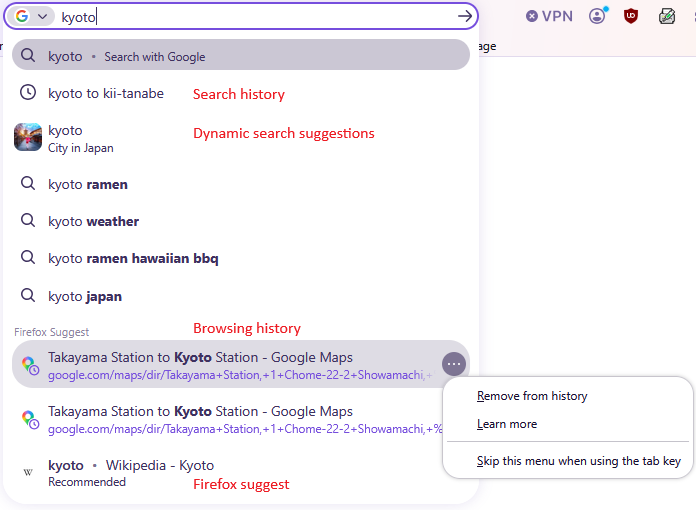
That feature's not even in my search bar, and I was trying to deal with my address bar, which is also exhibiting a similar lack of featuring menu.
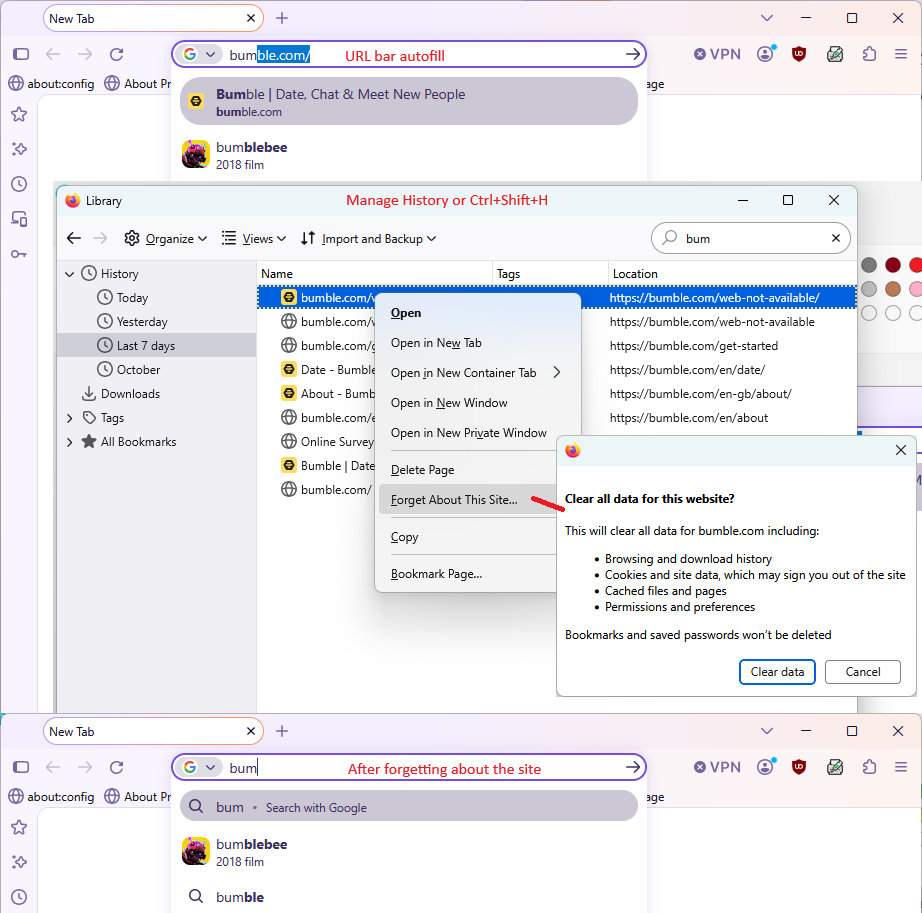
If the problem is specifically with an address suggested inside the address bar, which I call in-URL-bar autofill, it is more challenging to flush that. I'm only aware of one way, which is to flush all history for the site using Forget About This site. I'm attaching an example screenshot showing where to do this in the Library window (AKA Manage History).
Wot jscher2000 - Support Volunteer změnjeny
That's- !
it's so cumbersome, especially when I might have to return to that site at some point in the future!
If I have to do that to other suggested autofills in the URL-bar, it'd be a real time-waster!
EDIT: And what happened to that other feature, anyway? It was direct, and so easy!
Wot Reikson změnjeny
I don't think there has ever been an easy way to delete in-URL-bar autofill entries.
But I turn the feature off in my main profile since I don't think it saves me any time.
Unbelievable.
So I'm dating myself when I say that feature was very useful in past versions, and that I think that it should be returned.
Honestly, you should update the help-page article to reflect that, then. That the only way to get an errant listing off the address bar autofill-ins is to erase all trace of it from Firefox history, and to say that the "shift+delete" effect is no longer applicable.
I suspect I have been using Firefox longer than you have, but I could be wrong.
About updating support articles:
You can use Shift+Delete on historical items on the drop-down panel. The article "Address bar autocomplete suggestions in Firefox" refers to "the list" in the "Removing autocomplete results" section, which I read as something different from the address bar, but that may not be clear to everyone. If you think it can be improved, you can suggest an edit. Do you see an "Editing Tools" menu on the right side of the page?
Alternately, perhaps there should be a separate new section about in-URL-bar address suggestions referring to the "Forget About This Site" section of the article "Remove websites from the address bar suggestions." Or a call-out? Some articles have a yellow box saying, in effect, if you're looking for this other thing, there's a different article for that.