


Since the last update I dont have a spell check

Since the last update I dont have a spell check
Wubrane rozrisanje
Can you please ensure that your spell check is using the correct language?
To do so, please try the following:
- Enter
about:configin the Firefox address bar - Click the I'll be careful button
- Locate the
spellchecker.dictionarystring - Change the value to
en-USor the language code that applies to you
Note: You may have to restart Firefox for the changes to take effect.
Wšě wotmołwy (10)
For some reason, the spell check feature must have been disabled. Please enable it again by following these steps:
- Enter
about:preferences#advancedin the Firefox address bar - Select the General tab
- Check Check my spelling as I type
Note: You may need to restart Firefox for the changes to take effect.
its already selected but still not working
Wubrane rozrisanje
Can you please ensure that your spell check is using the correct language?
To do so, please try the following:
- Enter
about:configin the Firefox address bar - Click the I'll be careful button
- Locate the
spellchecker.dictionarystring - Change the value to
en-USor the language code that applies to you
Note: You may have to restart Firefox for the changes to take effect.
i typed in spellchecker but just got services.sync.prefs.sync.spellchecker.dictionary;true
My apologies. That preference is only included in my Firefox browser because I am using an alternative addon for spellchecking. The default Firefox spellcheck feature does not use an addon.
It's possible that an addon is preventing the spellcheck feature from functioning properly. Try Firefox Safe Mode to see if the problem goes away. Firefox Safe Mode is a troubleshooting mode that temporarily turns off hardware acceleration, resets some settings, and disables add-ons (extensions and themes).
If Firefox is open, you can restart in Firefox Safe Mode from the Help menu:
- Click the menu button
 , click Help
  and select Restart with Add-ons Disabled.
If Firefox is not running, you can start Firefox in Safe Mode as follows:
- On Windows: Hold the Shift key when you open the Firefox desktop or Start menu shortcut.
- On Mac: Hold the option key while starting Firefox.
- On Linux: Quit Firefox, go to your Terminal and run firefox -safe-mode
(you may need to specify the Firefox installation path e.g. /usr/lib/firefox)
When the Firefox Safe Mode window appears, select "Start in Safe Mode".
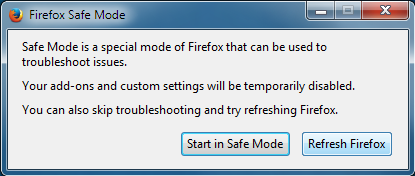
If the issue is not present in Firefox Safe Mode, your problem is probably caused by an extension, theme, or hardware acceleration. Please follow the steps in the Troubleshoot extensions, themes and hardware acceleration issues to solve common Firefox problems article to find the cause.
To exit Firefox Safe Mode, just close Firefox and wait a few seconds before opening Firefox for normal use again.
When you figure out what's causing your issues, please let us know. It might help others with the same problem.
tried it and its still not working also now after the restart its searching in yahoo.co.uk and not google
Note: Please do not mark this question as solved until the issue is no longer present. Doing so will prevent this thread from displaying on our other volunteers' dashboard.
The Refresh feature (called "Reset" in older Firefox versions) can fix many issues by restoring Firefox to its factory default state while saving your bookmarks, history, passwords, cookies, and other essential information.
Note: When you use this feature, you will lose any extensions, toolbar customizations, and some preferences. See the Refresh Firefox - reset add-ons and settings article for more information.
To Refresh Firefox:
- Open the Troubleshooting Information page using one of these methods:
- Click the menu button , click help and select Troubleshooting Information. A new tab containing your troubleshooting information should open.
- If you're unable to access the Help menu, type about:support in your address bar to bring up the Troubleshooting Information page.
- Click the menu button
- At the top right corner of the page, you should see a button that says "Refresh Firefox" ("Reset Firefox" in older Firefox versions). Click on it.
- Firefox will close. After the refresh process is completed, Firefox will show a window with the information that is imported.
- Click Finish and Firefox will reopen.
Did this fix the problem? Please report back to us!
i already refreshed it
Can you please file a bug report about this issue on Bugzilla, that way our developers can take a look at the issue?
On a side note, your system details provided to us shows that you are running Firefox 43.0. Please note that since that version was released, two quick patches were released, meaning that we are now on version 43.0.2. If you try updating, perhaps the issue has been patched.
In the meantime, I recommend trying this addon until the builtin feature is repaired.
Wot Wesley Branton změnjeny
i have 43.0.2