


Copies not placed because of "network or file access errors"

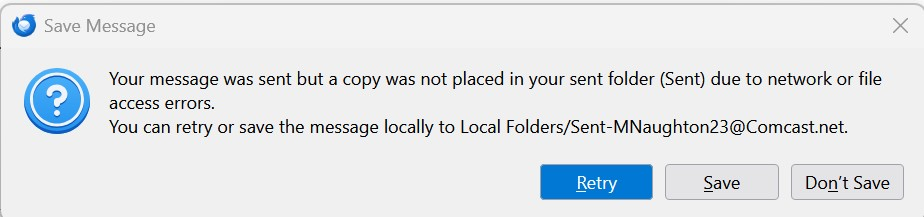
I have been using Thunderbird for years for email accounts with Comcast (Xfinity), Yahoo, and gmail. Yesterday, I started having a problem with my Comcast accounts - when I sent a message, it went out, but I got an error message (attached) saying it couldn't save a copy to the Sent folder. Sending messages from my Yahoo account works fine. Sending messages from my gmail accounts, I get _two_ copies in the Sent folder (this is new).
I tried restarting my PC, and that didn't help. I tried Troubleshoot Mode, but that didn't help. I tried reinstalling Thunderbird, and that seemed to fix it, but then it started again. I tried compacting the folders, and that seemed to fix it, but then it started again.
I can connect to the Comast/Xfinity server fine, and things work. If I send an email from the server, a copy goes in the Sent file, and it then shows up in the Sent folder on my desktop. But emails that I send from the desktop don't show up in the Sent folder.
I am using a Dell XPS8950 with Windows 11.
Thank you for your help.
Svi odgovori (2)
Just to make a comment: the error message may be true. The path from your PC to the Comcast server, receiving the message being sent and also the copy to be saved. That is two transactions, and the path when sent from web server is not the same, nor is the path to Yahoo the same. So, while there may be extenuating issues, the message is sometimes true.
David - thank you for your comment. I agree that the error message may be true; I guess my question is how best to troubleshoot this problem?
I am not an expert on email client/server communications, but my thinking that if the message is true then this is a very specific path/access issue, because a) the emails through Comcast/Xfinity do go through (they just don't end up in the Sent folder), b) if I get on the Comcast server and send an email, it gets copied to the Sent folder there, and then it shows up in the Sent folder on my PC, and c) if I get on the server and compose an email and save it, it goes to the Drafts folder on the server and later shows up in the Drafts folder on my PC. So it seems like there is communication back and forth, except in the specific cases of a) email that's sent from my PC not being copied to the Sent folder, and b) email that's composed and saved on my PC not being saved in the Drafts folder.
But, as I say, I'm not an expert, so maybe my thinking is off-base.