


Issue with Firefox Search Bar Redirecting Input to Address Bar
Hello,
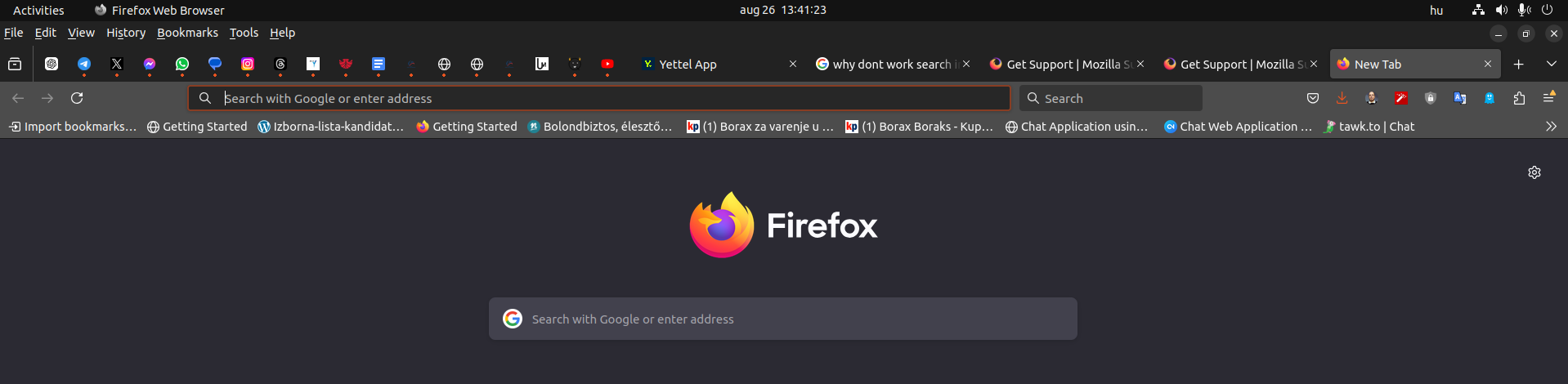
I'm experiencing an issue with the search bar on the Firefox homepage. When I click into the search field and begin typing, the cursor jumps to the address bar, and the text I’m entering gets redirected there instead of staying in the search bar.
I've checked my search settings, and everything seems to be in order. I’ve also tried disabling add-ons, but the issue persists. Could you please assist me in resolving this problem?
Thank you for your help.
Best regards, Tivadar Tot
Izabrano rješenje
Enter about:config in the address bar and switch browser.newtabpage.activity-stream.improvesearch.handoffToAwesomebar to false.
Pročitaj ovaj odgovor u kontekstu 👍 2Svi odgovori (2)
Odabrano rješenje
Enter about:config in the address bar and switch browser.newtabpage.activity-stream.improvesearch.handoffToAwesomebar to false.
TyDraniu said
Enter about:config in the address bar and switch browser.newtabpage.activity-stream.improvesearch.handoffToAwesomebar to false.
THANK YOU!