


Open
trouble setting up Thunderbird

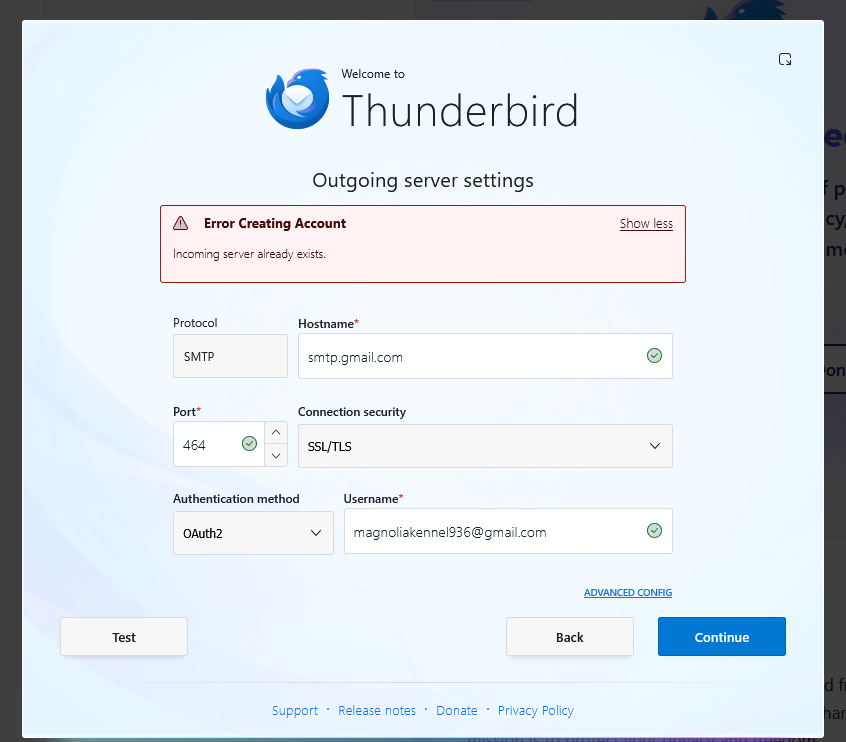
I installed thunderbird for Windows on PC all was good till it went looking for a outgoing server a red box popped up and said outgoing server is already installed . That ended the install.
I installed thunderbird for Windows on PC all was good till it went looking for a outgoing server a red box popped up and said outgoing server is already installed . That ended the install.
All Replies (2)

It may be because you have the wrong SMTP server port. All of my several Gmail accounts use these settings, with port 465, not 464
SMTP Server Name: smtp.gmail.com Port: 465 Connection Security: SSL/TLS Authentication method: OAuth2 User Name: <my email address>
The message says that the incoming server already exists. Are you trying to set up an account that is already set up?