


Not able to download Zip files from Google drive after compressing

I'm not able to download Compiled zip files from google drive. I have an folder with a lots of image so when I download folder, google compresses them in zip and then it downloads. but I'm not able to download the images. I don't know since when it started happening or which version because my Firefox browser is on auto-update.
פתרון נבחר
jonzn4SUSE said
Turning off ETP, I'm able to download. see screenshot How about you?
I was suddenly able to download the zip files? idk how, I didn't do a thing to fix it. maybe a new update got rolled out?
השתנתה ב־ על־ידי satyamverma.8.b
כל התגובות (9)
Hi satyamverma.8.b,
If you use extensions ("3-bar" menu button# or Tools -> Add-ons -> Extensions) that can block content (e.g. Adblock Plus, NoScript, Flash Block, Ghostery) then make sure such extensions do not block content. There is security software that can interfere with loading content, so check that as well.
Start Firefox in Safe Mode to check if one of the extensions ("3-bar" menu button# or Tools -> Add-ons -> Extensions) or if hardware acceleration is causing the problem.
- switch to the DEFAULT theme: "3-bar" menu button# or Tools -> Add-ons -> Appearance
- do NOT click the "Refresh Firefox" button on the Safe Mode start window
- https://support.mozilla.org/en-US/kb/troubleshoot-firefox-issues-using-safe-mode
- https://support.mozilla.org/en-US/kb/troubleshoot-extensions-themes-to-fix-problems
Clear the cache and remove the cookies from websites that cause problems via the "3-bar" Firefox menu button (Options/Preferences).
"Clear the cache":
- Firefox/Options/Preferences -> Advanced -> Network -> Cached Web Content: "Clear Now"
"Remove the cookies" from websites that cause problems.
- Firefox/Options/Preferences -> Privacy -> "Use custom settings for history" -> Cookies: "Show Cookies"
Thank You.
Already done this but didn't help and so I posted a question here

Yep, I can replicate the issue. When I click to download from Google Drive, I see things in bottom left of the browser, but nothing downloads. Let me verify that all the cookies are allowed.
Turning off ETP, I'm able to download. see screenshot How about you?

For me a cookie that is already allowed is being blocked. see screenshot
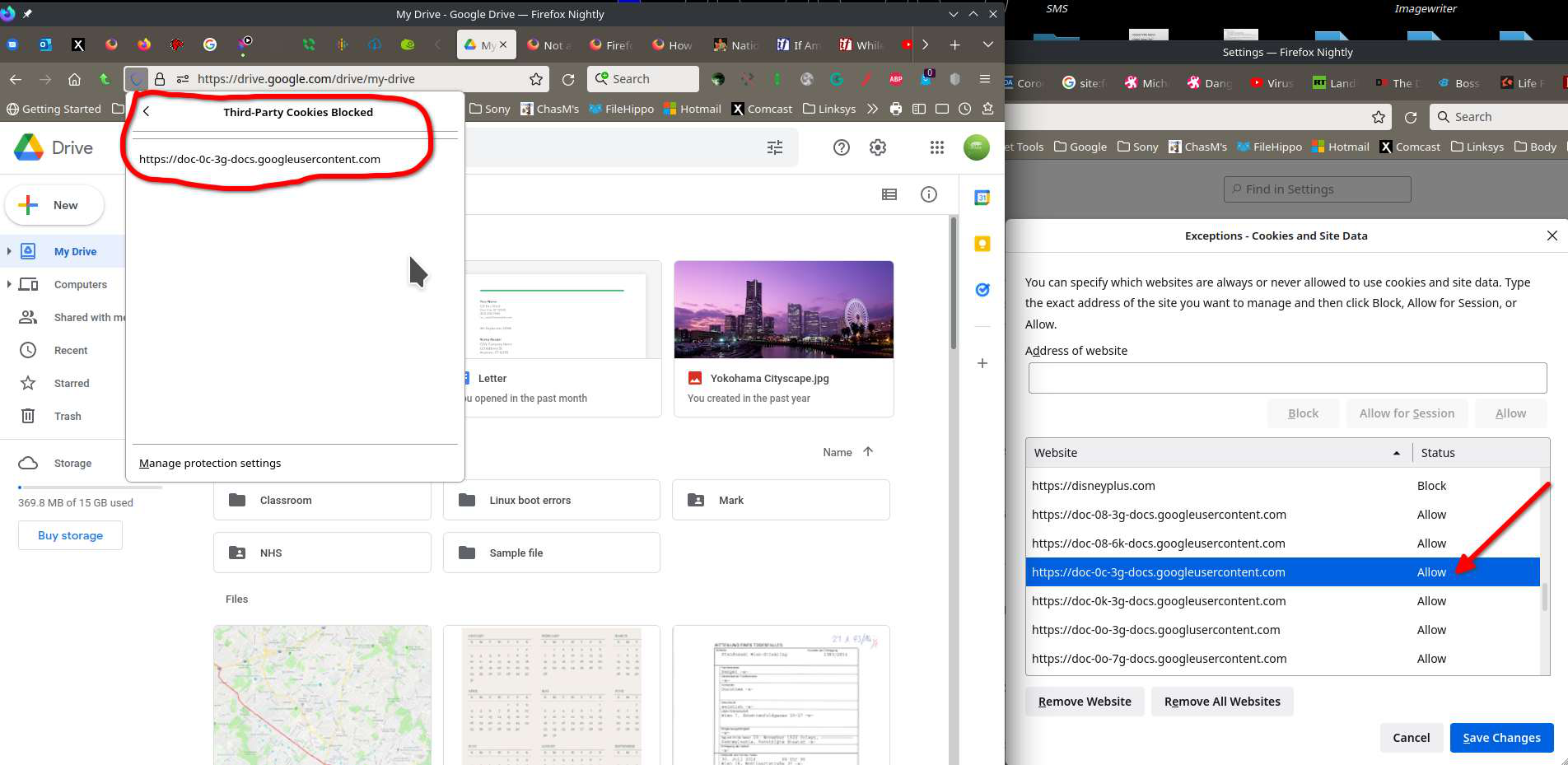
Are you using a proxy when this is happening ?
You can check the connection settings.
- Settings -> General -> Network: Connection -> Settings
I'm not. It's happening for me in multiple versions of Firefox and Waterfox.
השתנתה ב־ על־ידי jonzn4SUSE
פתרון נבחר
jonzn4SUSE said
Turning off ETP, I'm able to download. see screenshot How about you?
I was suddenly able to download the zip files? idk how, I didn't do a thing to fix it. maybe a new update got rolled out?
השתנתה ב־ על־ידי satyamverma.8.b
You're right! It just worked for me. ;-)) Mark your comment as resolved and lets hope it stays this way.