

Wannan tattaunawa an rufeta kuma ta zama daɗaɗɗiya.
Yi sabuwar tambaya idan ka na bukatar taimako.

Locked
Ajiyayyu
Tried about:config does not owrk now NEWTAB facebook/twitter etc.list is my startpage and comes up with every tab PLEASE how do I disable this awful newtab

I want to get rid of the newtab as my start page (homepage selected in options, but does not pan out) and it comes up with every link. I tried about :config/ about:newtab to about:blank. now it is WORSE because it is now the homepage too.
I want to get rid of the newtab as my start page (homepage selected in options, but does not pan out)
and it comes up with every link. I tried about :config/ about:newtab to about:blank. now it is WORSE because it is now the homepage too.
All Replies (2)
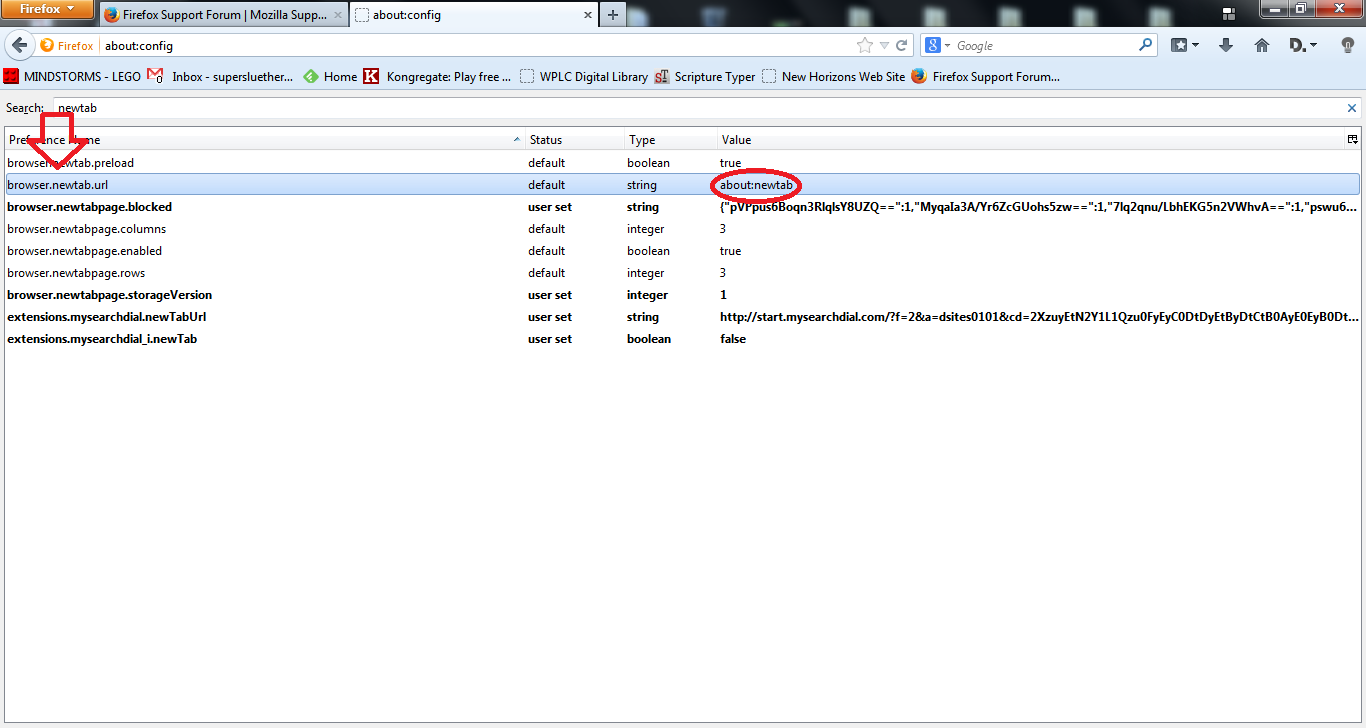
Go to about:config, and search for 'newtab'. On 'browser.newtab.url', set the value to about:newtab. This is the default value.
If this doesn't work, try resetting Firefox. All of your data will be saved, and Firefox will be reset to the defaults. Refresh Firefox - reset add-ons and settings
Locking duplicate thread.
Please continue in your other thread: