I can't send or receive emails using wifi

I am not able to receive or send emails using my wifi, but can using data (same provider). I have queried this with my email host and wifi provider and both have said there is no issue on their end that would block these actions. The email host suggested I change port 465 to 587 for outgoing to see if that made a difference. It did not.
This issue is occurring on the web platform as well as the android app.
The error message in account setting is: an error occurred connecting to gsyd1001.siteground.net:993."
All Replies (2)

... This issue is occurring on the web platform as well as the android app. ...
This seem to be a Phone Setting issue rather than Thunderbird because both Web platform and App are impacted.
You need to verify your phone Settings \ apps \ <Specific app> \ Wifi is toggle to off.

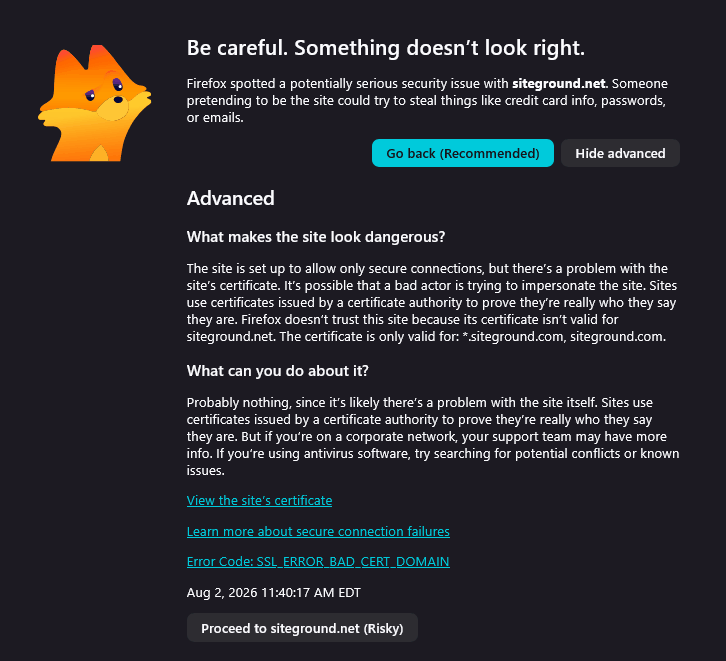
I can't fully explain it, but I bet it has something to do with the error message I get when I try to go to siteground.net with my web browser. See attached image. Apparently, the host has an invalid certificate, so Firefox blocks access. Perhaps Thunderbird does, too. The article cited in the error message also mentions that it could be due to your computer's anti-virus or security software.
Here's the text of the error message:
Be careful. Something doesn’t look right.
Firefox spotted a potentially serious security issue with siteground.net. Someone pretending to be the site could try to steal things like credit card info, passwords, or emails.
What makes the site look dangerous?
The site is set up to allow only secure connections, but there’s a problem with the site’s certificate. It’s possible that a bad actor is trying to impersonate the site. Sites use certificates issued by a certificate authority to prove they’re really who they say they are. Firefox doesn’t trust this site because its certificate isn’t valid for siteground.net. The certificate is only valid for: *.siteground.com, siteground.com.
What can you do about it?
Probably nothing, since it’s likely there’s a problem with the site itself. Sites use certificates issued by a certificate authority to prove they’re really who they say they are. But if you’re on a corporate network, your support team may have more info. If you’re using antivirus software, try searching for potential conflicts or known issues.
View the site’s certificate
Learn more about secure connection failures ( https://support.mozilla.org/en-US/kb/secure-connection-failed-firefox-did-not-connect )
Error Code: SSL_ERROR_BAD_CERT_DOMAIN
Aug 2, 2026 11:40:17 AM EDT