


Windows 10 reached EOS (end of support) on October 14, 2025. For more information, see this article.

Search Support

Avoid support scams. We will never ask you to call or text a phone number or share personal information. Please report suspicious activity using the “Report Abuse” option.

Learn More

Thunderbird 145.0 pro Win nezobrazuje česká jména výchozích složek IMAP

more options

Po aktualizaci na verzi 145.0 (Windows) se přestaly zobrazovat jména výchozích IMAP složek v českém jazyce. Jedinná složka, která se zobrazuje v pořádku je "Doručená pošta" (sent). Zkoušel jsem přepnout Thunderbird na anglickou lokalizaci a poté zpět na českou ale bez úspěchu. Jednoduché přejmenování složek přes "vlastnosti" také nefunguje (název nelze editovat). Je možné nějak upravit lokalizaci nebo složky přejmenovat?

Zobrazený název -> Správný překlad: drafts -> Koncepty Templates -> Šablony sent -> Odeslaná pošta archive -> Archiv spam -> Spam trash -> Koš

<Eng> After updating to version 145.0 (Windows), the names of the default IMAP folders stopped displaying in Czech. The only folder that still displays correctly is “Doručená pošta” (Inbox). I tried switching Thunderbird to the English locale and then back to Czech, but without success. Simply renaming the folders via “Properties” also doesn’t work (the name can’t be edited). Is it possible to adjust the localization somehow or rename the folders?
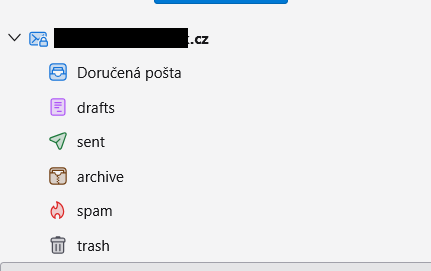
Po aktualizaci na verzi 145.0 (Windows) se přestaly zobrazovat jména výchozích IMAP složek v českém jazyce. Jedinná složka, která se zobrazuje v pořádku je "Doručená pošta" (sent). Zkoušel jsem přepnout Thunderbird na anglickou lokalizaci a poté zpět na českou ale bez úspěchu. Jednoduché přejmenování složek přes "vlastnosti" také nefunguje (název nelze editovat). Je možné nějak upravit lokalizaci nebo složky přejmenovat? Zobrazený název -> Správný překlad: drafts -> Koncepty Templates -> Šablony sent -> Odeslaná pošta archive -> Archiv spam -> Spam trash -> Koš <Eng> After updating to version 145.0 (Windows), the names of the default IMAP folders stopped displaying in Czech. The only folder that still displays correctly is “Doručená pošta” (Inbox). I tried switching Thunderbird to the English locale and then back to Czech, but without success. Simply renaming the folders via “Properties” also doesn’t work (the name can’t be edited). Is it possible to adjust the localization somehow or rename the folders?
Attached screenshots

All Replies (2)

more options

Riešilo sa to tu asi pred 14 dňami: https://support.mozilla.org/cs/questions/1548192

more options

Ok, děkuji. Verze 146.0 už tento problém nemá.

Ask a question

You must log in to your account to reply to posts. Please start a new question, if you do not have an account yet.