Reset TB Message Fields

For 4 days, I have been unable to send an email. There is no "send" option. Also, in past, when composing an EM, my complete address book as been available in a column on page left. Sorry to bother. I have just grown too old (84) to search out answers on my own. Thank you! Kenneth Fincher kfincher9999@att.net, a long-time TB user and supporter.
Chosen solution
While the compose window is open and has focus obviously for these instructions.
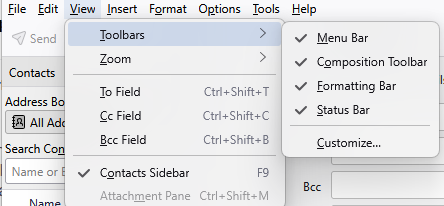
Press F9 to toggle the address list. If you have no menu bar press the Alt key or Press F10 both make the menu bar appear. I prefer using F10 Select the view menu with your mouse and then the Composition toolbar as it is the component that has the send button on it. (note that Ctrl+Enter is a keyboard shortcut for send)
Personally I would recommend setting it as shown below with everything on that menu selected for use.
Ler a resposta no contexto 👍 1
All Replies (1)
Chosen Solution
While the compose window is open and has focus obviously for these instructions.
Press F9 to toggle the address list. If you have no menu bar press the Alt key or Press F10 both make the menu bar appear. I prefer using F10 Select the view menu with your mouse and then the Composition toolbar as it is the component that has the send button on it. (note that Ctrl+Enter is a keyboard shortcut for send)
Personally I would recommend setting it as shown below with everything on that menu selected for use.