


should i sync tb

hi, if i sync 2 t/bird installs which one will install its personal data on the other pc?. the same question also applies to my f/fox install if anyone knows
win 10 tb145.02
thanks very much if anyone knows
bill modificouno o
Chosen solution
Menu app icon > Density There are three settings: Compact, Default and Relaxed
The spacing may look different if you have a different font size. Menu app icon > Font Size Check to see if have the same on each computer.
However, you might have different screen resolution on each computer which would alter the pixel size, so it might be worth checking to see if that is also effecting your visual view of things. You may find a font size of 14 is ok on one computer but works beter using 16 on the other.
Ler a resposta no contexto 👍 1All Replies (8)
Chosen Solution
Menu app icon > Density There are three settings: Compact, Default and Relaxed
The spacing may look different if you have a different font size. Menu app icon > Font Size Check to see if have the same on each computer.
However, you might have different screen resolution on each computer which would alter the pixel size, so it might be worth checking to see if that is also effecting your visual view of things. You may find a font size of 14 is ok on one computer but works beter using 16 on the other.
bill said
hi, if i sync 2 t/bird installs which one will install its personal data on the other pc?. the same question also applies to my f/fox install if anyone knows win 10 tb145.02 thanks very much if anyone knows
Toad-Hall said
Menu app icon > Density There are three settings: Compact, Default and Relaxed The spacing may look different if you have a different font size. Menu app icon > Font Size Check to see if have the same on each computer. However, you might have different screen resolution on each computer which would alter the pixel size, so it might be worth checking to see if that is also effecting your visual view of things. You may find a font size of 14 is ok on one computer but works beter using 16 on the other.
sorry i must have forgotten to press send when i replied to this , i did fix it with a setting called "appearance" i used your suggests to fine tune it too. thanks
if i sync both accts i may lose emails so i dare not try it until i know some helpful person here will give a hand if it goes wrong. so far no takers for the problem
as a mod pointed out ive asked 60 questions...well, i really dont know why my pc has goes wrong so often...is there a question limit?
they are both imap accts . i cant figure out if when i sync them which acct will show its emails , and will mails from the other acct be lost
i tryed asking this in a new post but post has been deleted thanks anyone
can a moderator. delete this post pls as i now get its replys in my inbox as new mails, problem is also resolved thanks
bill said
if i sync both accts i may lose emails so i dare not try it until i know some helpful person here will give a hand if it goes wrong. so far no takers for the problem as a mod pointed out ive asked 60 questions...well, i really dont know why my pc has goes wrong so often...is there a question limit?
There's no limit.
they are both imap accts . i cant figure out if when i sync them which acct will show its emails , and will mails from the other acct be lost
If both account on both computers are using Imap protocol then they are already synched to the server. Imap only displays whatever is on server. The only difference is your settings between the two computers.
You may have a deleted folder connection to a server which auto deletes anything in Trash after eg: 30 days.
eg:
- you may choose to not subscribe to some folders on one computer and see all on another. So obviously there would be a difference in the account Folder Pane display.
- The Deleted folder properties - are both checking for new mail? Sometimes you would need to select the 'Deleted' folder to force an update.
- If on one computer -you put copies into the 'Local Folders' account and then delete the original copies from server - then the other computer will not see what you have put into 'Local Folders' and it will also delete the emails you have deleted off server.
In other words, always copy emails to 'Local Folders' and do not delete the original off server until you have done the same on the other computer. OR accept only one computer has the 'Local Folder' store. OR periodically copy the 'Local Folders' folder in profile on one computer and use it to replace the one on the other computer. Remember Thunderbird would need to be closed on both computers before doing this.
Some people have used 'Shared folders' for the 'Local Folders' but it does come with it's own risks. If using eg: OneDrive then that's just putting all your emails back onto another server run by Microsoft which requires access permissions. Lose access to the MS account and have some fun trying to regain access to all those emails. Most people use 'Local Folders' because they want those emails stored on their computer and not on a server.
You could consider a NAS drive as a storage for profile, but it may also present issues. You update one computer and it updates the profile, so other computer may not work as it has no acess to profile until updated. Thunderbird is not really designed to work with NAS drives etc.
You also may find if one computer is accessing profile then it's locked, so other computer cannot access it simultaneously.
Or maybe a Remote Desktop setup - read some info. https://support.microsoft.com/en-gb/windows/how-to-use-remote-desktop-5fe128d5-8fb1-7a23-3b8a-41e636865e8c
i tryed asking this in a new post but post has been deleted thanks anyone
Toad-Hall said
bill said
if i sync both accts i may lose emails so i dare not try it until i know some helpful person here will give a hand if it goes wrong. so far no takers for the problem as a mod pointed out ive asked 60 questions...well, i really dont know why my pc has goes wrong so often...is there a question limit?There's no limit.
they are both imap accts . i cant figure out if when i sync them which acct will show its emails , and will mails from the other acct be lostIf both account on both computers are using Imap protocol then they are already synched to the server. Imap only displays whatever is on server. The only difference is your settings between the two computers.
You may have a deleted folder connection to a server which auto deletes anything in Trash after eg: 30 days.
eg:
- you may choose to not subscribe to some folders on one computer and see all on another. So obviously there would be a difference in the account Folder Pane display.
- The Deleted folder properties - are both checking for new mail? Sometimes you would need to select the 'Deleted' folder to force an update.
- If on one computer -you put copies into the 'Local Folders' account and then delete the original copies from server - then the other computer will not see what you have put into 'Local Folders' and it will also delete the emails you have deleted off server.
In other words, always copy emails to 'Local Folders' and do not delete the original off server until you have done the same on the other computer. OR accept only one computer has the 'Local Folder' store. OR periodically copy the 'Local Folders' folder in profile on one computer and use it to replace the one on the other computer. Remember Thunderbird would need to be closed on both computers before doing this.
Some people have used 'Shared folders' for the 'Local Folders' but it does come with it's own risks. If using eg: OneDrive then that's just putting all your emails back onto another server run by Microsoft which requires access permissions. Lose access to the MS account and have some fun trying to regain access to all those emails. Most people use 'Local Folders' because they want those emails stored on their computer and not on a server.
You could consider a NAS drive as a storage for profile, but it may also present issues. You update one computer and it updates the profile, so other computer may not work as it has no acess to profile until updated. Thunderbird is not really designed to work with NAS drives etc.
You also may find if one computer is accessing profile then it's locked, so other computer cannot access it simultaneously.
Or maybe a Remote Desktop setup - read some info. https://support.microsoft.com/en-gb/windows/how-to-use-remote-desktop-5fe128d5-8fb1-7a23-3b8a-41e636865e8c
i tryed asking this in a new post but post has been deleted thanks anyone
thanks very much that make a lot of sense..
you say; "Lose access to the MS account and have some fun trying to regain access to all those emails. Most people use 'Local Folders' because they want those emails stored on their computer and not on a server."
Where do i find the settings to use "local" folders as opposed to "shared" please, and by saying "most people wANt mail stored on their computer" does that mean they choose pop protocol?, although i somehow think they do not and that i may have misunderstood.
thanks
The 'Local Folders' account is a special account auto created by Thunderbird. The 'Local Folders' account is listed in the 'Account Settings'. The 'Local Folders' account is also auto displayed in the Folder Pane and it contains the 'Outbox' folder used to stored emails that have been composed and set as 'Send Later'.
It means anything stored in that account is stored on your computer. It is not a pop nor imap account. Anything in 'Local Folders' account is an independent copy on your computer. It does not synchronise with any server.
Pop accounts also store emails on your computer. Pop accounts can only access the server Inbox and download mail to the pop account Inbox. The folders do not synchronise with any folder on the server. These folders are independent copies.
Imap accounts are different. All imap folders synchronise with server folders so they can display exactly the same as on the server. A copy is downloaded to your computer, but you should not consider them to be independent of the server because they can only show what is on the server. If you use your webmail account to delete or move any emails then when you start Thundrebird the imap folders will synchronise to show what is on server, so anything you deleted will be deleted from the imap account. That means if you access on computer one using imap account and deleted an emails, then it will also get deleted from the imap account on computer two when those imap folders syncronise with server.
If you have an imap account and you want to: Create more quota space on server, you can get copies of fully downloaded emails that are in an imap folder and put the copy in the 'Local Folders' account and then delete the email off the server. It means you still have the email as shown in 'Local Folders', but it's no longer on server nor in the imap account. Some people also keep copies of important emails in the 'Local Folders' account and still keep the original in the imap account.
re :"most people wANt mail stored on their computer" does that mean they choose pop protocol?, Pop will store emails on their computer because Pop does not synchronise with server. It means people can choose to delete off server and it will have no effect on a pop account.
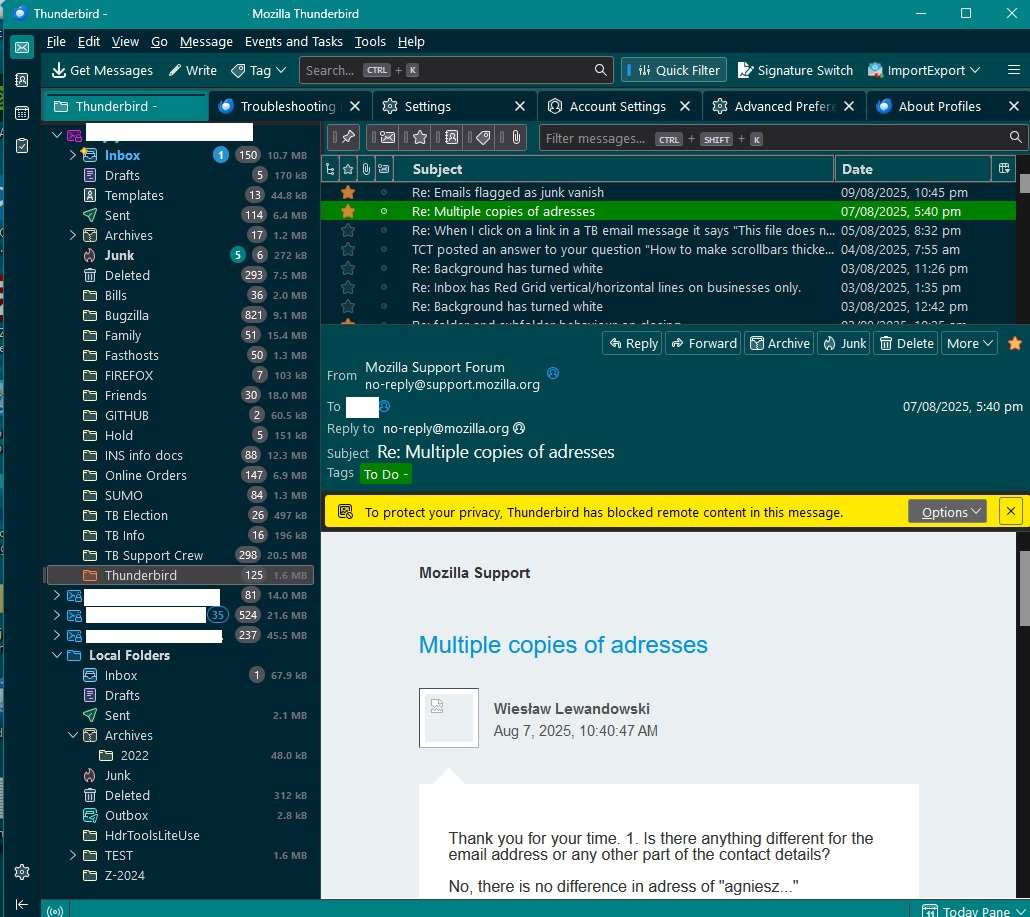
The image below shows my Folder Pane. It shows four accounts, 3 are pop, 1 is imap and at the bottom it shows the 'Local Folders' account.
Note: If you have Pop accounts on both computers that are to the same email address:
When you download to first computer, you will need to leave messages on the server so that they are still on server when you connect with second computer you can download the same messages. After you have downloaded to both computers then you can access server via webmail and delete those previously downloaded emails.
Pop is not the ideal protocol when you are downloading to two different computers as it's more time consuming. Also the two computers have independent pop accounts, so you would be duplicating all the folders and movement of emails into various folders. It also means anything you send will only be displayed in the pop account on that computer.
Pop accounts are perfectly ok if you only use one computer.