


Tab bar is too large/tall

How to minimize the topmost bar in Firefox?
By "topmost bar", I mean the bar containing, from left to right:
- Any open tabs - "+" (Open a new tab) - Down arrowhead (like a "V") - Empty space - Minus sign - Sign for 2 pages - "X"
The height of this bar is 2 cm !!
Thanks
Keazen oplossing
Many thanks to @jbr and @amoun for their kind responses.
Unfortunately, I'm now 81, so I need baby steps, rather than high-level instructions that involve jumping back and forwards between multiple links to different sites.
My new Dell should be arriving soon, so I can wipe this current Dell and use it for a spare. In the meantime, I'll block out the annoying tab bar with masking tape - with holes to show the tabs 🤣
Thanks Guys
Alle antwurden (3)
See support.mozilla.org/questions/1597676 if that looks similar. The last post has configuration values for different options.
If the above idea from jbr doesn't do enough, you can use a file [userChrome.css] to format any part of the browser window.
For the userChrome.css you make a file of that name and put it in the Chrome folder of you profile.
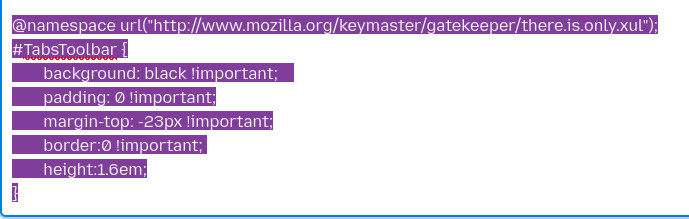
Then a small bit of code goes in the file
Then to enable userChrome.css in Firefox, go to the address bar, type about:config, and set toolkit.legacyUserProfileCustomizations.stylesheets to true. This allows Firefox to load your custom CSS file for UI modifications.
See image for example of code
Bewurke troch amoun op
Keazen oplossing
Many thanks to @jbr and @amoun for their kind responses.
Unfortunately, I'm now 81, so I need baby steps, rather than high-level instructions that involve jumping back and forwards between multiple links to different sites.
My new Dell should be arriving soon, so I can wipe this current Dell and use it for a spare. In the meantime, I'll block out the annoying tab bar with masking tape - with holes to show the tabs 🤣
Thanks Guys