


Option to delay Firefox updates until the browser is fully closed and the system has rebooted or shut down

Desired behaviour Please add an option that would make Firefox update only when:
- a) Firefox is completely closed — no open windows, no active profiles, no running `firefox.exe` processes of any kind.
- b) A Windows reboot or shutdown has occurred.
Current problem Currently, Firefox sometimes initiates an update while a session is still open — for example, when opening a new profile or seemingly at random. This interrupts active work and forces the update at an inconvenient time, meaning all tabs and workflow are disrupted.
Suggested improvements
- A good extra option could be modelled on Windows Update, which provides a series of delay settings.
- The update should wait until all `firefox.exe` processes have ended (currently, opening a new profile can trigger an update even with another profile running).
- A forced update that disrupts current work feels overly aggressive, especially when the update is not mission-critical. Even if it is critical, the timing should be a user choice.
Alternative approaches
- A selection could be provided to wait until the user has naturally finished, with all instances closed by choice, or until the computer is restarted after a Windows boot.
- A popup could appear with options to delay, or a notification saying "Update needed — please close browsers." There is no need to force this.
Workaround difficulty At present, the only way to achieve this is by writing a script. This overly aggressive update behavior could instead be controlled by a simple setting for advanced users. Being overly concerned about security to this level, should be a user choice not force. Turning it off and making it manual is still not as helpful as automation.
Great work, I just noticed this occurring several times in the few months mid session. All good wishes
Keazen oplossing
There are reports linked, but these are specifically for people running one single instance — that's a super weird bug.
Your case is currently known, unfortunately, unless disabled completely, even updates "on restart" are not aware of other running processes, so one profile can't tell there's a previous one still running. It's all tracked in the bug timelines I posted earlier, NB:
"We actually already know about this issue, it's described in Bug 1480452. As mentioned there, we have discussed the idea of not updating if other profiles are open. Unfortunately, it's not uncommon for malware to want to prevent Firefox from updating, and it's a bit too easy for malware to pretend to be Firefox in order to prevent it from ever updating."
(sorry that I don't have better news for you at the moment)
Alle antwurden (18)
A) or B) sorry. The system dosnt need to be rebooted, both can be triggers.
Hello
A space for users to give product feedback https://support.mozilla.org/en-US/kb/what-mozilla-connect
These similar discussions
https://connect.mozilla.org/t5/discussions/jesus-christ-another-update/td-p/130212
https://connect.mozilla.org/t5/discussions/firefox-background-updates/td-p/127410
Thanks, I will go post there
"Firefox updates when launching new profile, even when other profile is open" bugzilla.mozilla.org/1758669 that eventually got included under "Second instance of Firefox will apply update downloaded by still running first" bugzilla.mozilla.org/1480452 is pretty much describing this issue.
Thanks, I added this to feature request, so not a bug :)
Bewurke troch _MK_Peace op
I see you're using Windows, isn't actually Enable background updates on Firefox for Windows when Firefox is not running the functionality you're asking for?
The background updates feature adds a Firefox Background Update entry to the Windows Task Scheduler that, when enabled, will check for Firefox updates every 7 hours when the browser is not in use.In the Installation section, select Automatically install updates (recommended) and underneath that setting, check or uncheck the box next to When Firefox is not running to enable or disable background updates.
This is the implementation docs if you want to explore in more detail: https://firefox-source-docs.mozilla.org/toolkit/mozapps/update/docs/BackgroundUpdates.html if that fits your workflow.
Yeah I have those seleted, so it does not work.
As I explained, this occurs again and again.
I did check though, and the setting is the same. I have tried both firefox and developer.
It just overrides does not truly update with no firefox process.
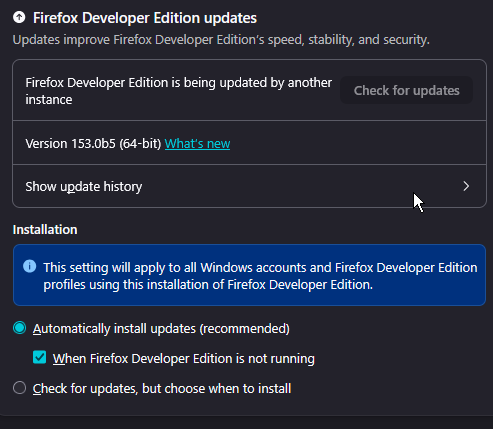
That's weird. I'm not sure how exactly the Mozilla Maintenance Service works for multiple channels installed side–by–side (since you mention Developer), please do make sure to mention that in your report in case it's important for understanding why it behaves that way.
If you only used release, I'd recommend considering store installation Download Firefox on Windows from the Microsoft Store that would handle the updates on its own (pretty much the way you describe — when the system performs maintenance, and/or the apps are not running), but Developer's not available there unfortunately:(
Hello
About the subject https://support.mozilla.org/en-US/kb/download-firefox-windows-microsoft-store About Settings/General/"Update Firefox" is missing A illustration https://support.mozilla.org/en-US/questions/1498260
Anyone else struggling with forced updates? https://www.reddit.com/r/firefox/comments/1ujbeu6/anyone_else_struggling_with_forced_updates
This is not solved. The issue works on developer and normal Firefox on windows.
A new profile or a delayed update can cause installation of update without rebooting Firefox
I have noticed this in both normal windows Firefox and developer on windows.
Then one is forced to close due to the update breaking the session .
It's odd as the settings are default, but they don't work as expected.
I have had this issue for at least the last year.
I think there is some issue with the update logic.
All Firefox processes need to be stopped for the installation of that version before updating .
I know this is the intention but it doesn't seem to work.
I think it would be very easy to fix by tying the logic to processors.
Bewurke troch _MK_Peace op
Other discussions https://support.mozilla.org/en-US/questions/1589626 https://support.mozilla.org/en-US/questions/1590154
Bewurke troch Agent virtuel op
I guess if it doesn't work.
Firstly do other people have this? I can't imagine I am the only person?
I could write a script that would check Firefox updates after reboot.
But as it is listed under settings I presume this is already meant to work out of the box.
It's a little hard to capture and prove. But I have definitely experienced it on an ongoing basis on multiple computers from memory.
Someone else has posted the same issue on Reddit: https://www.reddit.com/r/firefox/comments/1ujbeu6/anyone_else_struggling_with_forced_updates/
Keazen oplossing
There are reports linked, but these are specifically for people running one single instance — that's a super weird bug.
Your case is currently known, unfortunately, unless disabled completely, even updates "on restart" are not aware of other running processes, so one profile can't tell there's a previous one still running. It's all tracked in the bug timelines I posted earlier, NB:
"We actually already know about this issue, it's described in Bug 1480452. As mentioned there, we have discussed the idea of not updating if other profiles are open. Unfortunately, it's not uncommon for malware to want to prevent Firefox from updating, and it's a bit too easy for malware to pretend to be Firefox in order to prevent it from ever updating."
(sorry that I don't have better news for you at the moment)
Thanks I keep an eye if it happens without changing profile. As I was using different profiles for a long time I can't rule out.
Bug I am fairly sure that update may also get triggered by new window like incognito and also just getting forced. I am sure sometimes an update appears in the middle of a complex session.
I will try to submit bug report.
And I will try to write a script to replace Mozilla update if I can fix this.
All good wishes
I thought a script could be built for those who want a true, check on boot update.
I can't finish it at the moment, but I started if anyone wants to finish.
The script is here: https://www.pasteme.dev/rod-net-bit
It is written so it can work for any version, the version is picked from the live json:
   Stable (LATEST_FIREFOX_VERSION):
   powershell -command "(Invoke-RestMethod -Uri 'https://product-details.mozilla.org/1.0/firefox_versions.json').LATEST_FIREFOX_VERSION"
   Developer Edition (LATEST_FIREFOX_DEVEL_VERSION):
   powershell -command "(Invoke-RestMethod -Uri 'https://product-details.mozilla.org/1.0/firefox_versions.json').LATEST_FIREFOX_DEVEL_VERSION"
   ESR (FIREFOX_ESR):
   powershell -command "(Invoke-RestMethod -Uri 'https://product-details.mozilla.org/1.0/firefox_versions.json').FIREFOX_ESR"
The script is incomplete, but if anyone finishes please post here.