


Manually Sorting The Email Addresses In Tree....

In the email address tree on the start up page of Thunderbird, how can I manually sort the email address order? I have an address I would like to move to the top of the list.
I know it can be done, but I can not for the life of me remember how. Please help.....
I've read a lot of suggestions on the FAQ section, but what they are offering, I do not have listed in/on my Thunderbird.
Thank you.
Chosen Solution
Version 45.6.0 is a very old version which didn't have the feature to sort accounts. But you might try to download and install the version 1.1.1. of the add-on "Manually Sort Folders" https://services.addons.thunderbird.net/eN-US/thunderbird/addon/manually-sort-folders/versions/?page=1#version-1.1.1
All Replies (6)
I guess that you want to sort your email accounts in the (left) Folder pane. Go to the App button ≡ in the upper right corner and open the Account Settings tab .... In the left pane of Account settings you can move your accounts up and down at your convenience.
Thank you for your response.
I get into the Accounts Settings page with no problem. But then I am stumped. How do I move y accounts up and down the list to where I want them. I've tried everything - at least everything I can think of.
So, my question has now become, "How do you move the email address accounts up and down the list on your accounts settings page?"
Thank you again for your help.....
Which Thunderbird version are you using? It is a simple drag & drop action: in the left pane of Account Settings left-click on the account name you want to move and hold down the mouse button, then drag the account to its new position and let go the mouse .... In my screen recording I drag the "Mapenzi" account above the "POP-1998" account
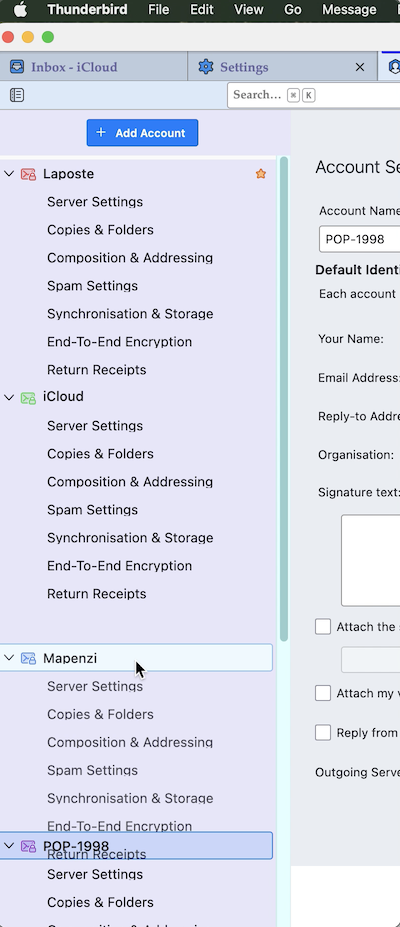
Modified by Mapenzi
I am using my old desktop computer while my laptop is at Dell getting an overhaul. That being said, I think my Thunderbird is an older version. It says that it is: version 45.6.0.....
Hope this helps.
Chosen Solution
Version 45.6.0 is a very old version which didn't have the feature to sort accounts. But you might try to download and install the version 1.1.1. of the add-on "Manually Sort Folders" https://services.addons.thunderbird.net/eN-US/thunderbird/addon/manually-sort-folders/versions/?page=1#version-1.1.1
Thank you. This solved the problem. Although since it is so old of a fix, I had to download from the Windows store 'BreeZip' in order to open the file reader - but it was seamless and no problem at all....
It worked and all is well. Thank you again for your help.