


How can I make the distance between the folders in Post In smaller

How can I make the distance in Inbox smaller?
All Replies (7)
make what part smaller? yo want the items on a single line or the space between lines smaller or what?
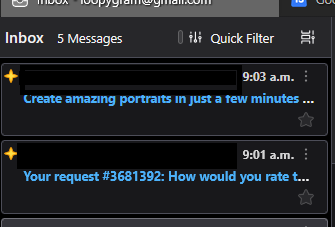
I have this problem also. It wasn't me that inquired about it before but this is what I want also. For me it is the width of the column I would like to be able to set it in different widths at different times. On my screen it is 4" wide measuring it with my tape here. It takes up a lot of room so I would like to be able to make it more narrow or wider whichever the case maybe. Right now it can't be moved one way or the other.
Thank you
Loopy

Loopy said
I have this problem also. It wasn't me that inquired about it before but this is what I want also. For me it is the width of the column I would like to be able to set it in different widths at different times. On my screen it is 4" wide measuring it with my tape here. It takes up a lot of room so I would like to be able to make it more narrow or wider whichever the case maybe. Right now it can't be moved one way or the other. Thank you Loopy
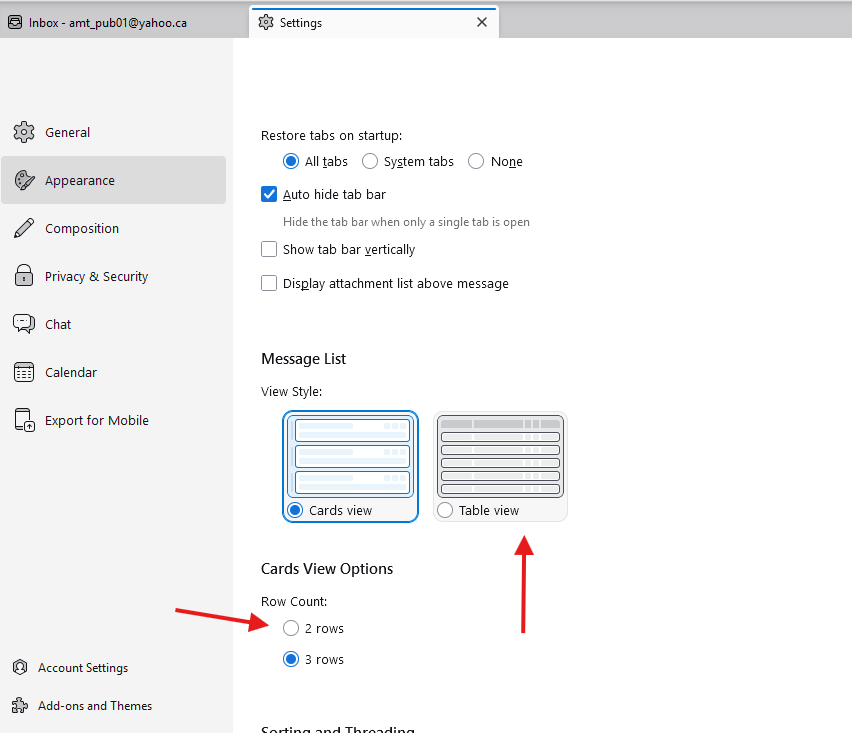
I think that you're view style is set to "Cards".
Your options are :
1) change row count to 2
Click on Tools, then Settings, then Appearance, at Message List, Card View Options, row count, click on 2
2) You may want to change view style to "Table View"
Click on Tools, then Settings, then Appearance, at Message List, click on Table View
Modified by Michel T
Hi Yes it is set on Card View. I tried to set it on Table view but still can't make that column any narrower. It is already changed to 2 rows Perhaps it can't be done. I can make it wider but it will not go narrower. Thanks for your help.
Regards Loopy
If you changed to Table View, you should be able to change the column width.
To change the column width, put your cursor at the Delimiter of the Column until you see the cursor becomes <=>, then move your mouse left to reduce or right to increase the size.

Modified by Michel T
Hi Yes I tried the table view but the inbox column seems to be set and I can not make it more narrow. In table view, you can change the sizes of the little columns inside of the inbox column. It seems the inbox column is set at that width. I can make it wider but not narrowe.
Thanks anyway. I appreciate your help. Have a good day.
Regards Norma C.

Norma, would you please post a screen image and point to the elements that you would like to change?