


Windows 10 reached EOS (end of support) on October 14, 2025. If you are on Windows 10, see this article.

Avatar for Username

Αναζήτηση στην υποστήριξη

Προσοχή στις απάτες! Δεν θα σας ζητήσουμε ποτέ να καλέσετε ή να στείλετε μήνυμα σε κάποιον αριθμό τηλεφώνου ή να μοιραστείτε προσωπικά δεδομένα. Αναφέρετε τυχόν ύποπτη δραστηριότητα μέσω της επιλογής «Αναφορά παραβίασης».

Μάθετε περισσότερα
Ανοικτό

Re: AOL.COM Login issues on Firefox

DR CLEMENT AKATENG MD

Dear Mozilla Firefox!

Of late, you have been blocking my access to my AOL.COM Accounts and email No matter how much I try, you keep coming up with a Firefox Security Dialogue box, asking me to insert my Security key into a USB port, which practically makes no sense,

This is what happens: At the start, AOL.COM presents a page with 4 icons: a Padlock, Face, Thumb, and Burst. And underneath is written: "You'll scan a QR code to sign in with passkey". Next is below.

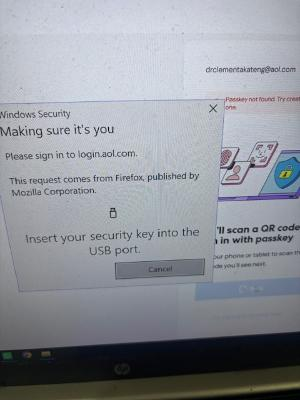
When I click Next, I am presented with your Firefox Dialogue box, and in it is written:

Windows Security Making sure it's you

Please sign in to login.aol.com

This request comes from Firefox,m, published by Mozilla Corporation

                                         Flash drive icon

Insert your security key into the

                      USB port.
                                          
                                         Cancel 

Firefox, where is the Security key, where is the USB, and why a Flash drive icon?

When I click Cancel, I am sent back to the beginning, and the whole exercise starts all over again.

So why are you blocking my access to my AOL.COM Account and email?

A quick response is needed.

Kind regards,

DR CLEMENT AKATENG MD
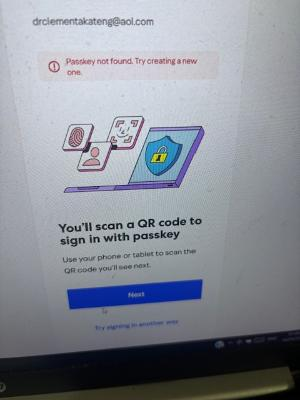
Dear Mozilla Firefox! Of late, you have been blocking my access to my AOL.COM Accounts and email No matter how much I try, you keep coming up with a Firefox Security Dialogue box, asking me to insert my Security key into a USB port, which practically makes no sense, This is what happens: At the start, AOL.COM presents a page with 4 icons: a Padlock, Face, Thumb, and Burst. And underneath is written: "You'll scan a QR code to sign in with passkey". Next is below. When I click Next, I am presented with your Firefox Dialogue box, and in it is written: Windows Security Making sure it's you Please sign in to login.aol.com This request comes from Firefox,m, published by Mozilla Corporation Flash drive icon Insert your security key into the USB port. Cancel Firefox, where is the Security key, where is the USB, and why a Flash drive icon? When I click Cancel, I am sent back to the beginning, and the whole exercise starts all over again. So why are you blocking my access to my AOL.COM Account and email? A quick response is needed. Kind regards, DR CLEMENT AKATENG MD
Συνημμένα στιγμιότυπα

Όλες οι απαντήσεις (1)

In other words, you're selecting this credential method on the AOL site.

You need to select a different method there to sign with them if you don't have this / don't want to use it.

(I believe the fine print in the photo says "Try signing in another way" or something alike — that's the link you want to use.)

Τροποποιήθηκε στις από τον/την jbr

Υποβολή ερώτησης

Πρέπει να συνδεθείτε στον λογαριασμό σας για να απαντήσετε σε δημοσιεύσεις. Ξεκινήστε μια νέα ερώτηση εάν δεν διαθέτετε ακόμα λογαριασμό.