


Windows 10 reached EOS (end of support) on October 14, 2025. If you are on Windows 10, see this article.

Avatar for Username

Αναζήτηση στην υποστήριξη

Προσοχή στις απάτες! Δεν θα σας ζητήσουμε ποτέ να καλέσετε ή να στείλετε μήνυμα σε κάποιον αριθμό τηλεφώνου ή να μοιραστείτε προσωπικά δεδομένα. Αναφέρετε τυχόν ύποπτη δραστηριότητα μέσω της επιλογής «Αναφορά παραβίασης».

Μάθετε περισσότερα
Ανοικτό

Credit card data is not showing under the autofill section of settings

jbr απαντήθηκε
blachanc

I have card data saved for a number of cards in Firefox, and I am looking to clean that data up. However, when I go to Settings>Passwords and autofill>Payment methods>Manage payment methods no cards are showing up as saved. I also know that this is not Lastpass causing issues, as this card data is not saved in Lastpass. I have attached screenshots of both the manage payments page and the card data showing up for autofill selection on a webpage add payment method screen.
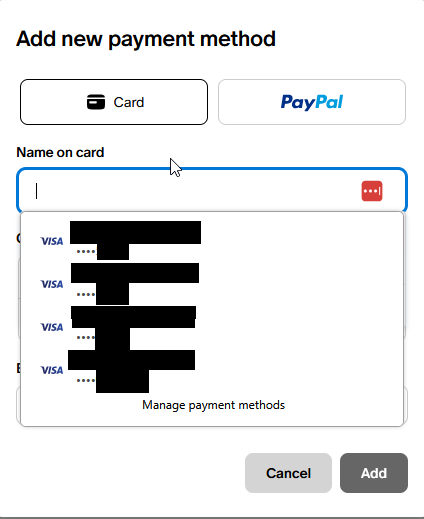
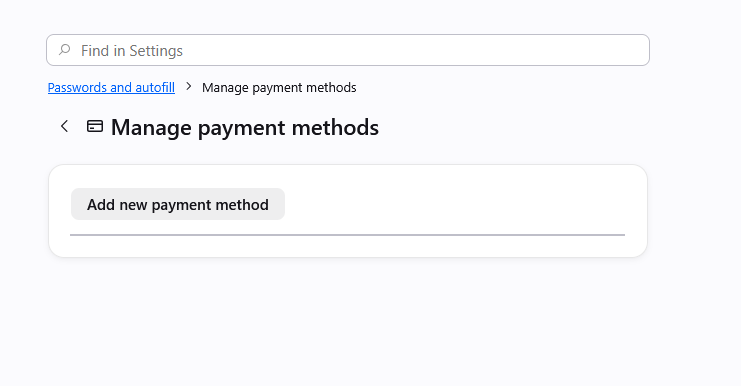
I have card data saved for a number of cards in Firefox, and I am looking to clean that data up. However, when I go to '''Settings>Passwords and autofill>Payment methods>Manage payment methods''' no cards are showing up as saved. I also know that this is not Lastpass causing issues, as this card data is not saved in Lastpass. I have attached screenshots of both the manage payments page and the card data showing up for autofill selection on a webpage add payment method screen.
Συνημμένα στιγμιότυπα

Όλες οι απαντήσεις (2)

Yes, at the moment there's a bug in case there were some older entries that had no expiration set, which then halts showing any cards:

There are some workarounds in previous thread support.mozilla.org/questions/1588553 if it's pressing, but a fix should ship hopefully within a few weeks.

This is fixed in v152.0.5: firefox.com/firefox/152.0.5/releasenotes

Υποβολή ερώτησης

Πρέπει να συνδεθείτε στον λογαριασμό σας για να απαντήσετε σε δημοσιεύσεις. Ξεκινήστε μια νέα ερώτηση εάν δεν διαθέτετε ακόμα λογαριασμό.