Windows 10 reached EOS (end of support) on October 14, 2025. If you are on Windows 10, see this article.

Αναζήτηση στην υποστήριξη

Προσοχή στις απάτες! Δεν θα σας ζητήσουμε ποτέ να καλέσετε ή να στείλετε μήνυμα σε κάποιον αριθμό τηλεφώνου ή να μοιραστείτε προσωπικά δεδομένα. Αναφέρετε τυχόν ύποπτη δραστηριότητα μέσω της επιλογής «Αναφορά παραβίασης».

Μάθετε περισσότερα

Αυτό το νήμα αρχειοθετήθηκε. Κάντε νέα ερώτηση αν χρειάζεστε βοήθεια.

Slow loading

  • 2 απαντήσεις
  • 0 έχουν αυτό το πρόβλημα
  • 115 προβολές
  • Τελευταία απάντηση από jonzn4SUSE

Going to ANY website, it takes "forever" to load, but after loading normal speed is experienced. One way to get a website to initially load more quickly is to click the "X" which the spinner is going endlessly, then refresh the page, whereupon it will usually load instantly.

The problem is experienced with any and every website. This problem does not occur with Chrome or Edge:

Windows 11, Firefox 142.0.1 64 bit.

Going to ANY website, it takes "forever" to load, but after loading normal speed is experienced. One way to get a website to initially load more quickly is to click the "X" which the spinner is going endlessly, then refresh the page, whereupon it will usually load instantly. The problem is experienced with any and every website. This problem does not occur with Chrome or Edge: Windows 11, Firefox 142.0.1 64 bit.

Όλες οι απαντήσεις (2)

"...click the "X" WHILE the spinner is going ...

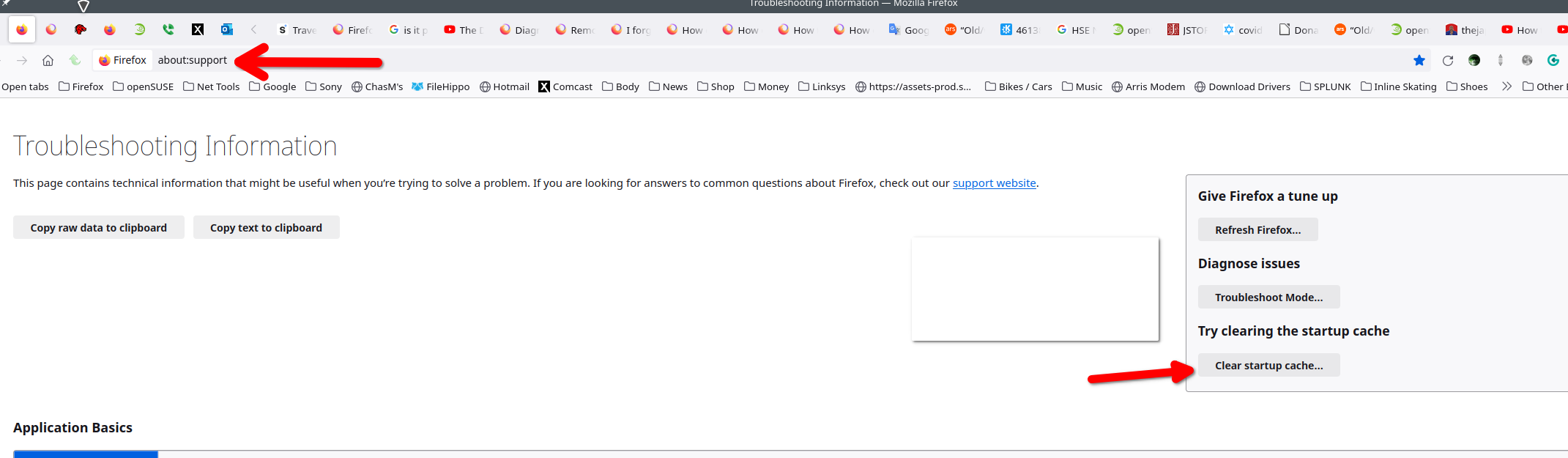
Did you clear the startup cache? see screenshot Did you try with Firefox in Troubleshoot Mode? https://support.mozilla.org/en-US/kb/diagnose-firefox-issues-using-troubleshoot-mode#w_how-to-start-firefox-in-4troubleshoot-modesf5safe-modesf

Did you clear your browser cache? https://support.mozilla.org/en-US/kb/clear-cookies-and-site-data-firefox

What is your dns setup in the computer, browser, and router?