


Can't launch a new private window from Windows Start Menu

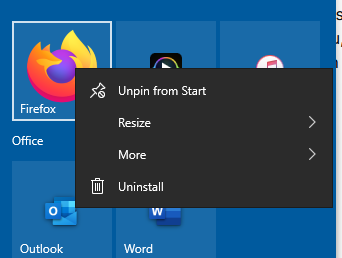
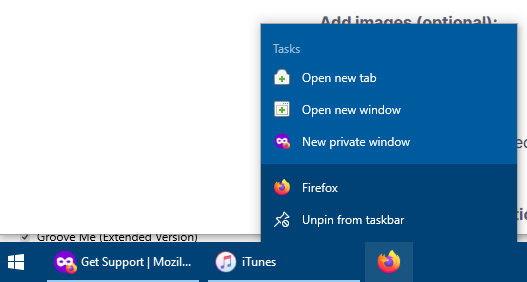
Ever since the latest update, whenever I right click the Firefox icon in the pinned tiles on the Windows Start Menu, the options to launch a new tab, new window and a new private window don't show up. They show up when I pin Firefox to the taskbar but not the Start Menu.
Images attached for illustration: right-clicking Firefox in Start Menu and right-clicking Firefox in taskbar
Όλες οι απαντήσεις (1)

It seems like you’re experiencing an issue where right-clicking the Firefox icon in the Windows Start Menu no longer shows options like "New Tab," "New Window," or "New Private Window," while they still appear in the taskbar. This could be a bug introduced with the latest update.
Here are a few things you can try to resolve this:
1. **Restart Firefox and Windows**: Sometimes, a simple restart of both Firefox and your computer can resolve display or behavior issues like this.
2. **Re-pin Firefox**: Unpin Firefox from the Start Menu and taskbar, then pin it again. This might help refresh the settings and restore the missing options.
3. **Check for Updates**: Make sure both Firefox and Windows are up to date. Mozilla may release a bug fix if this is a known issue.
4. **Firefox Profile Issue**: It could be related to your user profile. Try creating a new Firefox profile to see if the issue persists.
5. **Windows Settings**: There could be a setting in Windows that’s affecting how Start Menu tiles behave. Try checking the Start Menu settings in Windows.
Let me know if any of these steps help!